Kitchen Display System Cost: A Screen Is Cheap, Events Are Not


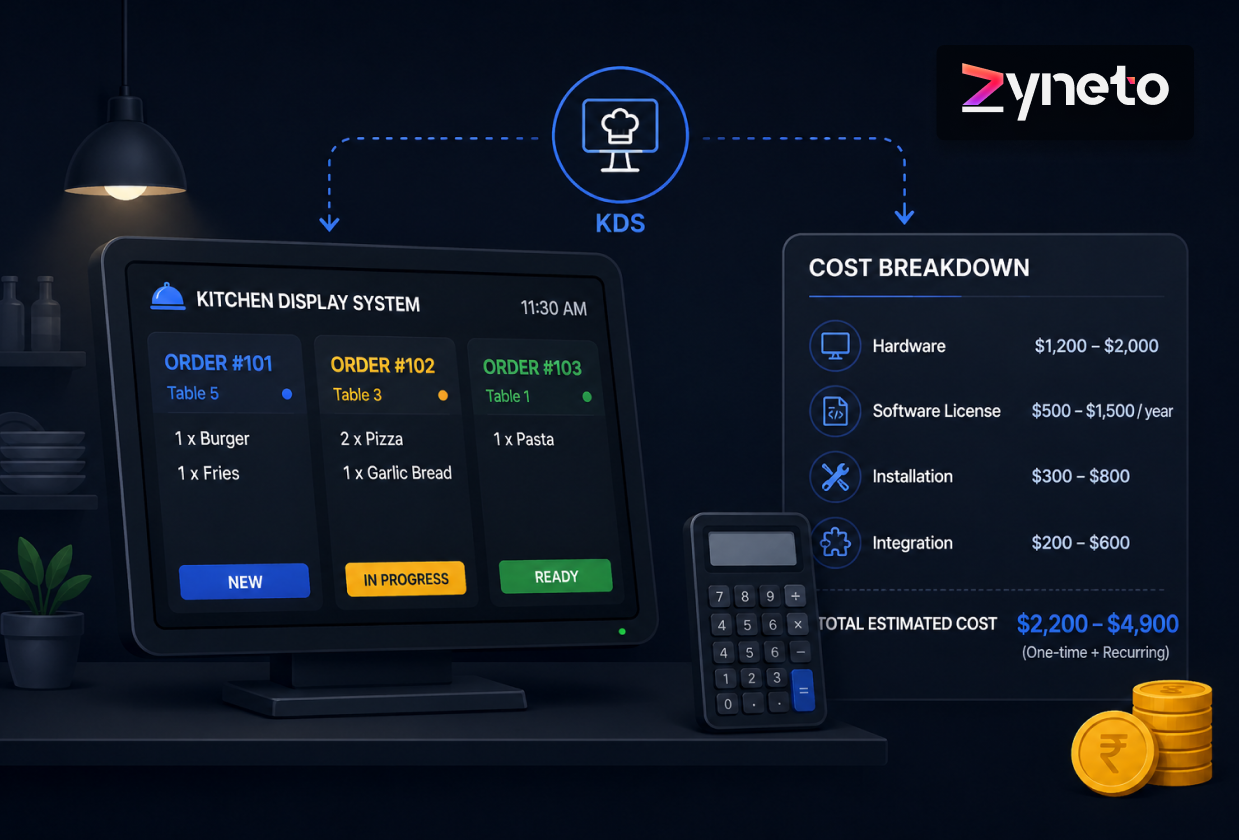
Ask five suppliers for a kitchen display system cost and you will get five numbers that are not measuring the same thing. Some are quoting hardware. Some are quoting a monthly fee per terminal. One is quoting an integration project.
They are not being evasive. Two genuinely different products are sold under this name, and the gap between them is not a feature list. It is whether the system emits a timestamped event every time an order changes state.
A KDS that only draws tickets is a screen replacing a printer. Useful, cheap, and the end of the story. A KDS that emits fired, bumped and completed with timestamps is the only honest measurement instrument your kitchen will ever have, and it costs several times more because that data has to be correct under conditions that actively work against it.
Set the two side by side.
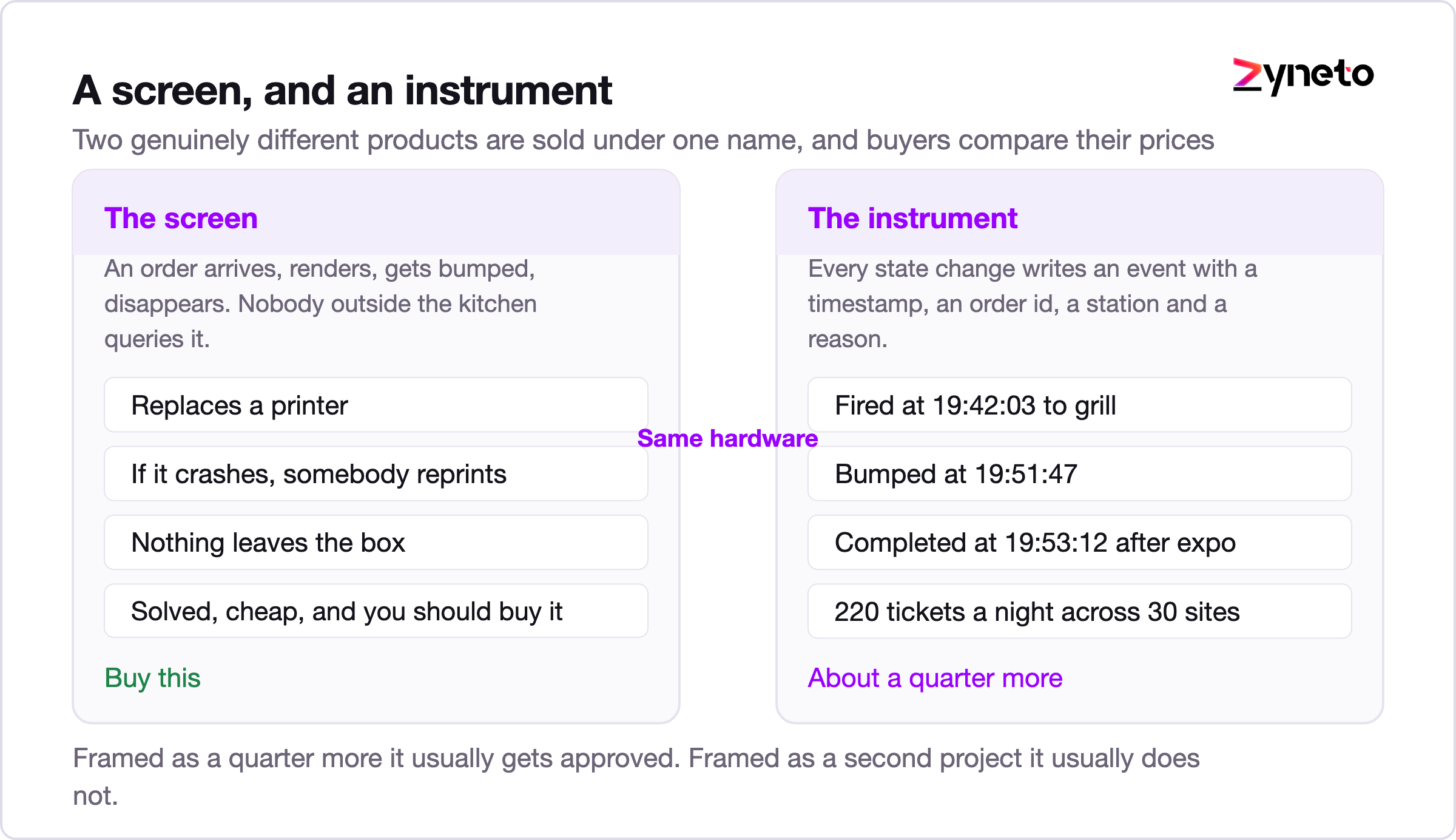
The screen. An order arrives from the POS, it renders, a chef presses a bump bar, it disappears. If the display crashes, someone reprints. Nobody outside the kitchen ever queries it. This is a solved problem and you should buy it.
The instrument. The same screen, plus a rule that every state change writes an event with a timestamp, an order id, a station and a reason. Fired at 19:42:03 to grill. Bumped at 19:51:47. Completed at 19:53:12 after expo. Those three rows, multiplied by 220 tickets a night across 30 sites, are what let you answer questions no operator can currently answer.
Which station is the bottleneck on a Saturday at eight. Whether the new menu item adds 90 seconds to every ticket it appears in. Which of your 30 kitchens is genuinely faster and which one just has quieter Fridays.
Most groups think they are buying the first and discover eighteen months later that they needed the second. By then the screens are installed, the contract has two years to run, and the vendor's API returns a nightly summary rather than events.
Before events, the ordering has to be right, and the conditions are worse than people expect.
That last point is why the food service page puts 10 to 16 weeks on a back of house project and says the slow part is almost never the integration. Agreeing what a menu item is across four channels takes longer than connecting to any of them.
An event sounds trivial. A row in a table. The cost sits in making the row trustworthy.
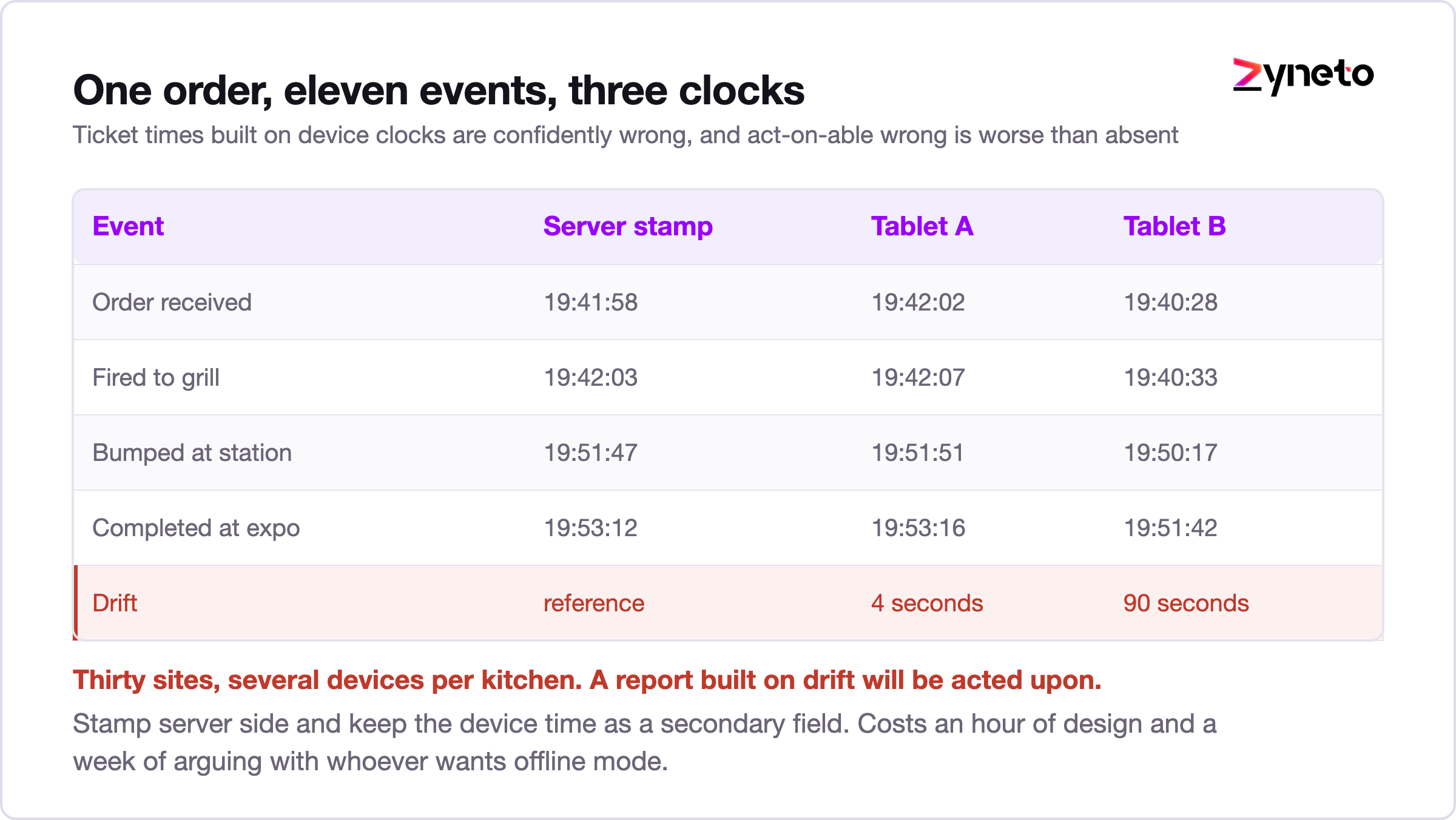
Forty to 90 hours covers event emission and timestamping properly. It is the smallest line in the table below and the one that determines whether any of the others were worth paying for.
Everything above applies to a burger shop. Coursing is where a KDS build gets genuinely difficult, and it is the part most quotes skip.
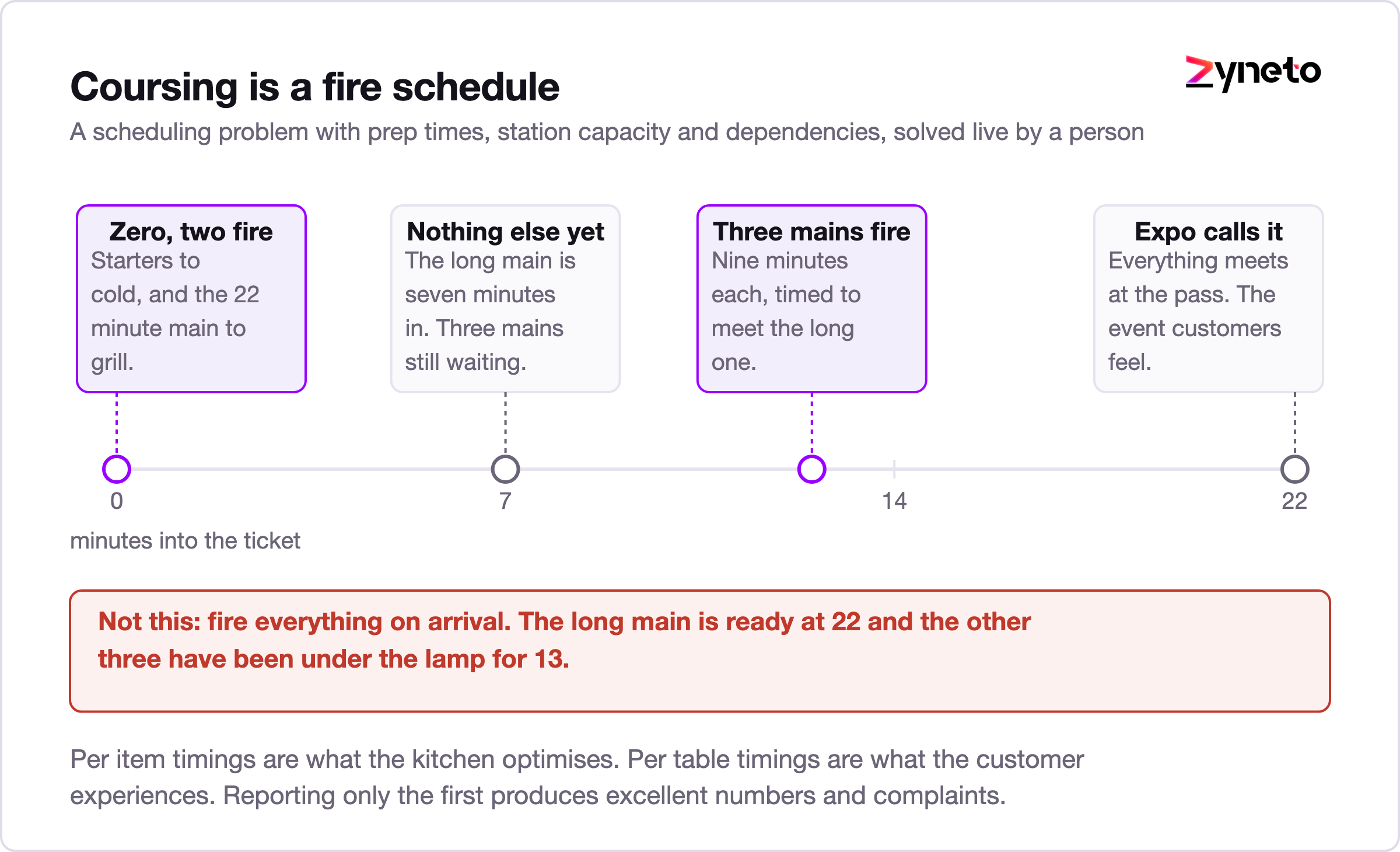
A table of four orders two starters, one shared side, three mains and one main that takes 22 minutes when the others take nine. The kitchen has grill, fryer, cold and pass. Nothing should be cooked yet except the long main. The starters fire immediately. The mains fire when the starters are cleared, except the long one, which fires now.
That is a scheduling problem with per item prep times, station capacity and a dependency graph, and it is being solved live by a human today. Systematising it is the 60 to 130 hours in the routing row, and doing it badly is worse than not doing it, because a kitchen that stops trusting the fire times will start ignoring the screen entirely.
Expo adds the last piece. Somebody has to decide the table is complete before it leaves, and that decision is another event, and it is the one that turns per item timings into per table timings. Per table is what the customer experiences. Per item is what the kitchen optimises. Reporting only the second is how a group ends up with excellent station times and complaints about slow service.
The rate is $40 to $100 per hour by role. Display client and reporting sit near the floor, order state modelling and routing near the ceiling, and mixed teams blend to around $65.
|
Module |
Hours |
What it covers |
|
Order intake and channel normalisation |
50 to 110 |
Four channels into one internal shape, idempotency on aggregator order ids |
|
Routing rules |
60 to 130 |
Station assignment, prep times, coursing, fire scheduling |
|
Display client and bump flow |
70 to 140 |
The screen, offline outbox, bump bar handling, recall |
|
Event emission and timestamps |
40 to 90 |
Server side clock, event schema, reconciliation after a drop |
|
Expo, coursing and multi station sync |
50 to 110 |
Table completion, cross station dependency, the pass |
|
Ticket time reporting |
40 to 90 |
Per station, per item, per table, per site |
Worked example. Intake 80 plus routing 95 plus display 105 plus events 65 plus expo 80 plus reporting 65 equals 490 hours. That is $19,600 at $40, $49,000 at $100, and about $31,850 at a $65 blend.
The full span across the six modules runs 310 hours at every minimum to 670 at every maximum.
Deliberately excluded: the tablets or terminals, mounting, the kitchen network, and any POS replacement. Hardware is a commodity with public pricing and the network is a building problem, not a software one. Any supplier folding those into a single figure is making comparison harder on purpose.
Notice what the numbers say. Take the event and reporting rows out, ship a screen only, and you have removed about 130 hours from 490. The instrument costs roughly a quarter more than the screen and does something categorically different. That is the trade to put in front of a finance director, because framed as a quarter it usually gets approved and framed as an extra project it usually does not.
Buy the screen. Genuinely. If all you need is tickets rendered and bumped, the market solves this well and cheaply, and a custom build is hard to justify.
Three situations change the answer.
1. Your POS will not emit what you need. The food service page puts this plainly: a KDS that only draws tickets is giving something up, and the thing it gives up is the event stream. Check before you sign whether the product can export fired, bumped and completed with timestamps, at the order line level, through an API rather than a nightly CSV. Ask for a sample payload. Vendors who have it will send one within a day.
2. You run more than about eight sites. Below that, an operations manager walking the pass is genuinely competitive with a reporting system. Above it, nobody can hold 30 kitchens in their head and the measurement starts paying for itself.
3. Coursing is central to your format. Casual dining and quick service can usually live with off the shelf routing. A restaurant group where the pass is the operation will fight the vendor's model every week.
The middle path we recommend most often: buy the display, build the event layer beside it, and keep the order model yours. That is roughly the intake, events and reporting rows, about 210 hours, and it leaves you free to change screens later without losing your history.
Cost arguments in food service work better in minutes than in money.
A site runs 220 tickets on a busy night at an average of 12 minutes. Find three minutes through routing changes and station rebalancing, which is a normal result once you can see where the time goes, and that is 660 minutes a night. Eleven hours of kitchen capacity, per site, per busy night.
You will not take eleven hours of labour out. That is not the point. What you get is headroom on the nights that currently cap out, which is the difference between turning tables twice and turning them once at your busiest fifteen minutes.
Across 30 sites, the same three minutes is the sort of number that makes a 490 hour build look small. And it is only measurable at all if the events exist, which is the argument this whole article has been making.
Groups with franchisees have a version of this problem that looks technical and is really contractual.
A franchisee owns their kitchen data in most agreements, or at least believes they do, and the franchisor wants comparable ticket times across the estate. Those two positions collide the first time a league table appears in a regional meeting.
The engineering answer is to decide early what leaves the site and in what shape. Aggregate ticket times by station and daypart, yes. Individual chef performance, almost never, because it changes behaviour in the wrong direction and it turns the screen into a surveillance device that staff will route around. We have seen a kitchen bump every ticket on arrival and cook from memory, purely because the numbers were being read as a personal metric.
There is a second wrinkle underneath it. Franchisees run different POS versions, sometimes different POS vendors entirely, and the group cannot force an upgrade mid contract. So the normalisation layer has to tolerate two or three order shapes at once and still produce one comparable event stream. Budget toward the upper end of the intake range, near 110 hours rather than 50, the moment a second POS appears in the estate.
Three things, and knowing them in advance turns a crisis into a Tuesday.
1] The screen shows too much. The first build always renders more than a chef can read at a glance during a rush, because it was designed on a laptop in a quiet room. Ticket density, font size and colour meaning all need one round of changes with the actual head chef standing at the actual pass. Reserve time for it rather than treating it as a defect.
2] Someone bumps to clear the screen. Covered above, and it will happen in week one. The fix is not a policy memo. Show the station its own median ticket time on the display and the behaviour corrects itself within days, because chefs are competitive and the number is now theirs rather than a manager's.
3] An aggregator changes something without telling you. A new modifier format, a renamed field, a webhook that starts arriving twice. This is normal and permanent. Build the intake layer so an unrecognised field is logged and the order still fires, rather than rejecting the order. A ticket that renders with one imperfect line beats a ticket that never appears, and that single design choice prevents most of the incidents in a first year.
Weeks 1 to 2. Capability read on the POS and every aggregator. Ask for sample payloads and confirm what each will emit and accept. This decides the hours on everything after it.
Weeks 2 to 5. Intake and normalisation, with idempotency in from the start rather than added after the first duplicate incident.
Weeks 5 to 7. Events and the reporting spine, before the display. Counterintuitive, and correct. If events land first you can measure the current kitchen with printers still on the wall, and that baseline is what proves the rest of the project worked.
Weeks 7 to 11. Display client, bump flow, offline outbox.
Weeks 11 to 14. Routing, coursing and expo, in one pilot kitchen with the head chef in the room.
Fourteen weeks, roughly 490 hours, and a baseline measurement by week seven that costs nothing extra and settles most of the arguments that follow.
About 310 to 670 hours at $40 to $100 per hour by role. A typical multi channel build lands near 490 hours, roughly $31,850 at a $65 blended rate. Terminals, mounting, the kitchen network and any POS replacement sit outside that figure.
Buy the screen. Build the event layer beside it if your POS or KDS vendor cannot export fired, bumped and completed with timestamps at order line level through an API. Ask for a sample payload before signing anything.
Because two products share the name. One renders tickets and gets bumped. The other emits a timestamped event at every state change and becomes your kitchen's measurement system. The second costs roughly a quarter more and does something different in kind.
They retry webhooks when acknowledgement is slow, which on a busy service it will be. Without idempotency on the platform's own order id the same ticket fires twice, two meals go out and one gets binned, and it is quiet enough that nobody reports it for weeks.
It is a live scheduling problem with per item prep times, station capacity and dependencies between courses, currently solved by a person. Systematising it is 60 to 130 hours, and doing it badly makes the kitchen distrust the fire times and ignore the screen.
Finding minutes. A site running 220 tickets at 12 minutes that recovers three minutes releases 660 minutes, about eleven hours of kitchen capacity on a busy night. That headroom is what lets a busy service turn tables again rather than cap out.
Events and reporting, before the display. It lets you measure the current kitchen with printers still on the wall, and that baseline is what proves whether everything after it worked.

Vikas has around fifteen years of experience building software and now builds generative AI systems at Zyneto. His work covers retrieval augmented generation, agentic AI, knowledge graphs, AI memory, and the evaluation and guardrails that decide whether any of it is safe to put in front of customers. He has shipped enterprise copilots, document AI, chatbots and predictive analytics for e-commerce, fintech and marketing teams, and works day to day in Python, JavaScript and SQL. He follows multimodal models, business process automation and enterprise AI security closely, and mentors engineers moving into AI. He writes about architecture, inference cost and the failure modes that only show up at production scale.
Share your details and we will talk soon.
Be the first to access expert strategies, actionable tips, and the trends actually shaping the digital world. No fluff - just practical insights delivered straight to your inbox.
Dive into our blog and stay ahead of the curve with expert perspectives, future-ready trends, and tech tips written for decision-makers and doers alike.