Chat With Your Documents: Enterprise AI With RAG, Knowledge Graphs, and Memory


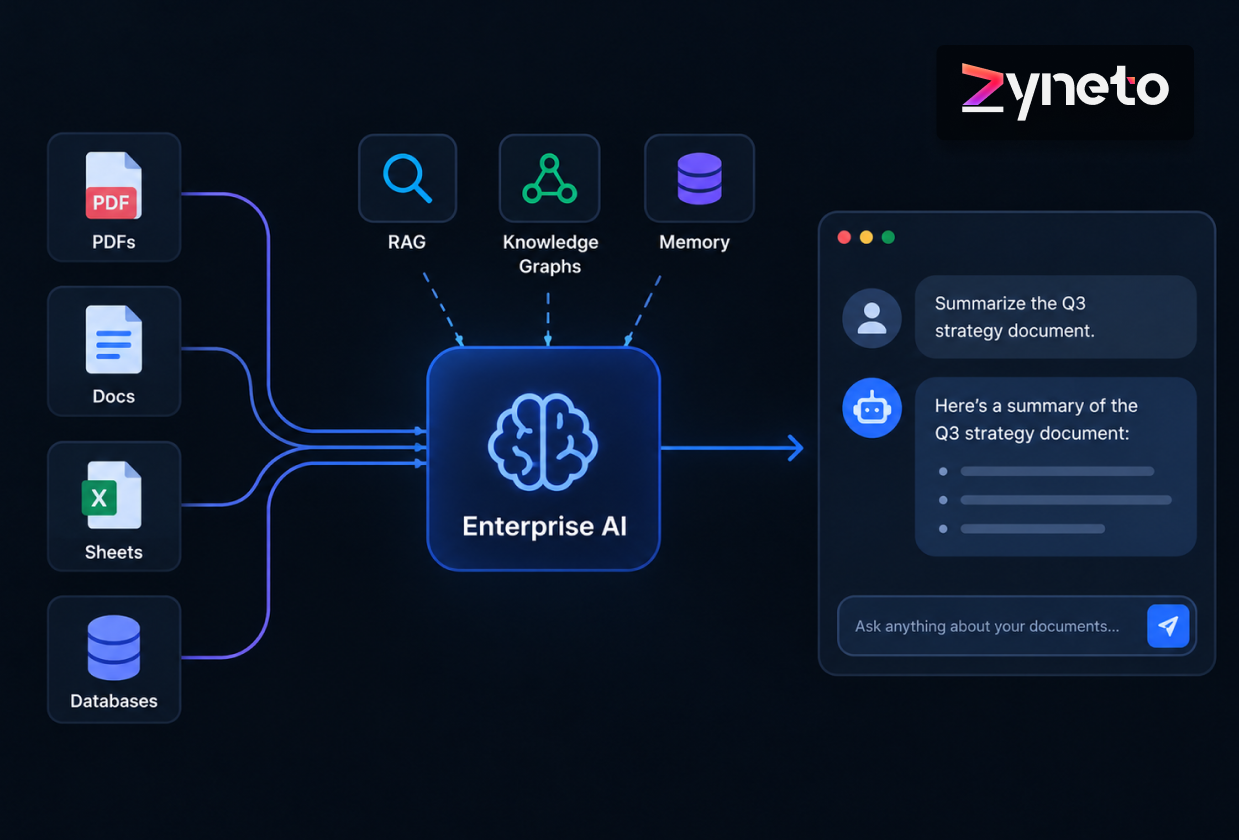
Ask a public AI model what your refund policy says. It has no idea. It learned from the open internet, not from your contracts, your tickets, or the handbook nobody has touched in two years. So it does what these models do when they run out of facts: it makes something up and says it with total conviction. The way out is to connect the model to your own material, so your team can chat with your documents and get answers grounded in them, with sources. The main technique has an unlovely name, retrieval augmented generation, or RAG. In the enterprise it rarely travels alone. Knowledge graphs and memory come along for the ride. Here is how each one works, where they overlap, and the unglamorous details that decide whether a project ever ships.
Try it yourself. Ask a model about last quarter's revenue, or which vendor a contract belongs to, and you get a shrug or a guess. Usually a guess. These systems are built to sound fluent, and fluent is easy to mistake for correct.
For a business, that is the whole game. An AI that has read the internet is a party trick. An AI that has read your onboarding guide, your support history, and the pricing exceptions your sales team keeps in their heads, and answers from them without inventing, is worth paying for. Getting there is less about the model and more about plumbing: putting the right internal information in front of it at the second it answers.
RAG sounds like a lot. It is not. Before the model replies, you find the slices of your content that bear on the question and pass them along as reference. The model reads those, then answers.
The unsung hero here is that vector database. It indexes meaning, not exact words, so someone asking about time off still lands on the paragraph that only ever says annual leave. That match on meaning is what makes the whole thing feel like it understood you, rather than ran find-and-replace.
One property matters more than it sounds. The knowledge lives in your data, not inside the model. Change a policy? Edit the document. Next time the assistant retrieves, it is current. Nothing to retrain. That is the single biggest reason document projects start with RAG rather than fine-tuning.
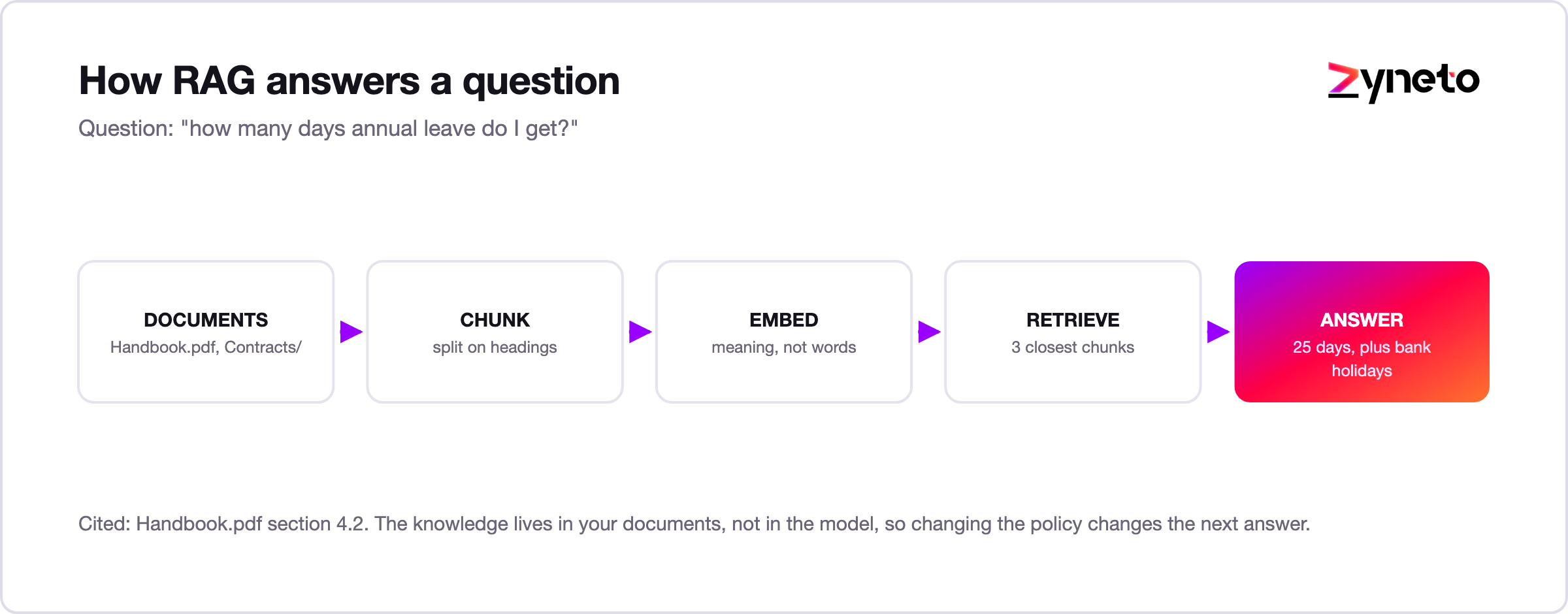
Step one looks like the boring step. It is the one that quietly determines whether the whole system works.
Cut chunks too small and you strip away the context that made a passage meaningful. A sentence reading "this does not apply to enterprise accounts" is useless on its own; retrieved without the rule it modifies, it is worse than useless, because the model may attach it to the wrong rule entirely.
Cut them too large and you drown the real answer in surrounding noise. The model gets three pages when it needed one paragraph, and the signal gets diluted.
Structure matters more than size. Splitting on headings and sections usually beats splitting every 500 characters, because a document's own structure already marks where one idea ends and the next begins. Tables and policy documents with exceptions deserve special handling, since a naive split is exactly what separates a rule from its carve-out.
If a RAG system is giving confidently wrong answers, chunking is the first place to look, well before anyone suggests changing the model.
Someone always asks whether to fine-tune instead. It is the wrong fork in the road, because the two do different jobs.
Fine-tuning shapes behavior. Tone, format, a particular way of reasoning. What it does not do, reliably, is teach facts, and it is a chore to redo every time the facts change. RAG shapes knowledge. It hands the model the right documents at answer time, which is exactly what you want for information that shifts week to week.
So it goes like this: RAG for what the assistant knows, fine-tuning for how it behaves. Need both? That happens, usually when you want a specific voice sitting on top of current facts. For most "chat with your documents" work, though, plain RAG is the answer.
RAG is great at finding relevant text. It is weaker when the question is really about relationships. "Which contracts mention this vendor and expire next quarter?" No single passage answers that. The answer lives in how things connect, not in any one paragraph that happens to share the words.
A knowledge graph fills that hole. It stores your world as things and the links between them: this contract belongs to that vendor, that vendor supplies this product, this product runs in that region. Wire the facts together like that, and the AI can walk the connections to answer questions that leave plain search flailing.
More and more systems run both. RAG pulls the relevant prose, the graph supplies the relationships, and the assistant handles "explain this clause" and "show me everything tied to this account" without breaking stride. Reach for a graph when your questions are about how things relate, not just what a document happens to say.
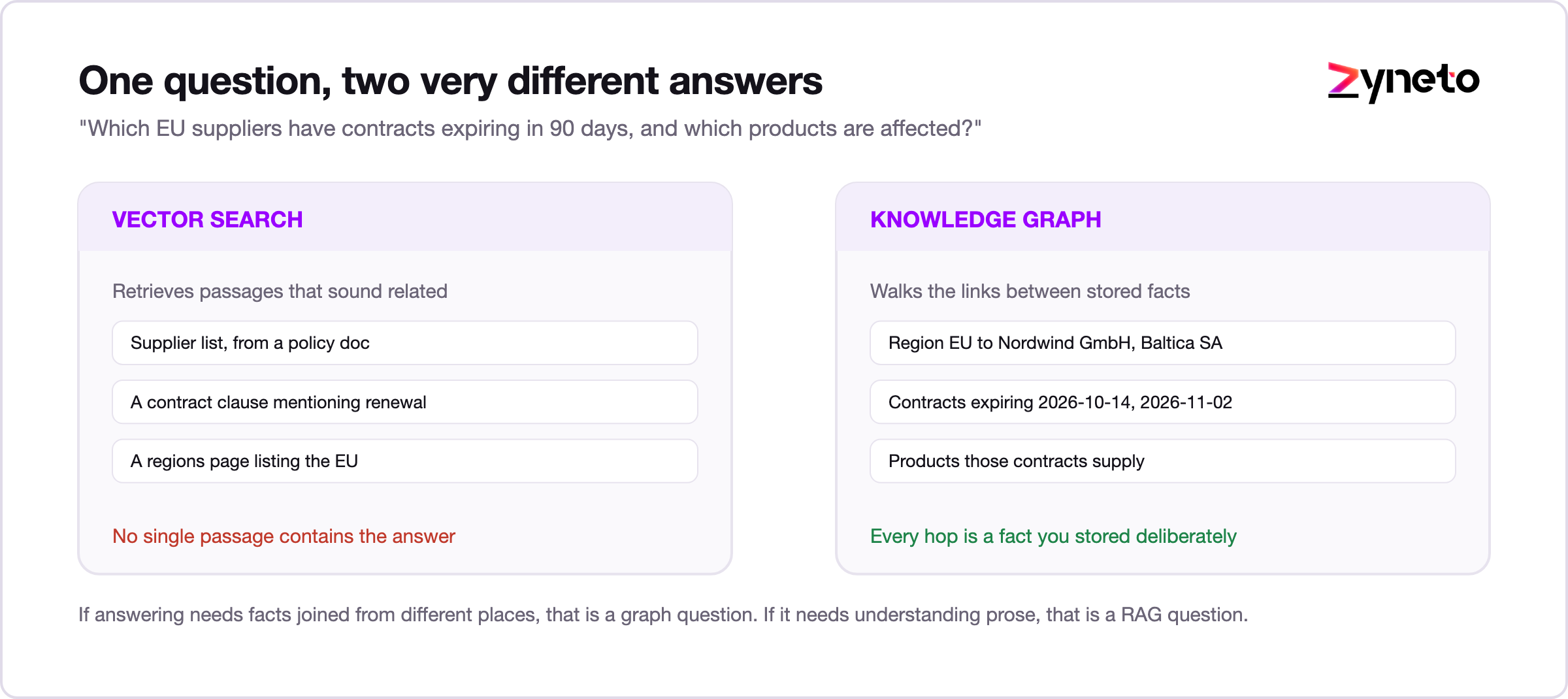
Take a procurement question: "which of our suppliers in the EU have contracts expiring in the next ninety days, and which products would that affect?"
Vector search handles this badly, and it is worth understanding why. There is no single paragraph anywhere in your document set that contains that answer. The supplier list is in one system, the contract dates are in the contracts themselves, the regions are on supplier records, and the product mapping lives somewhere else again. Retrieval finds passages that sound related, and the model assembles something plausible from fragments. Plausible is the dangerous word.
A graph answers it by walking links. Start at the region node, follow the edges to suppliers, follow those to contracts, filter on the expiry date, then follow product edges back out. Every hop is a fact you stored deliberately, so the answer is either right or provably missing, never invented.
The rule of thumb: if answering your question requires joining facts that live in different places, that is a graph question. If it requires understanding a passage of prose, that is a RAG question. Most enterprises have both kinds, which is why most serious builds end up with both layers.
An assistant that forgets everything the moment you hit send feels broken. Memory fixes that, and it comes in two flavors.
Short-term memory is the current conversation. The model holds the recent back-and-forth in its context window, so a follow-up like "and what about last year?" makes sense. It is capped by how much text fits, and it vanishes when the session ends.
Long-term memory sticks around. The assistant saves useful facts, preferences, and past decisions, then pulls them back later, usually through the same retrieval trick as RAG. This is what lets it remember an account's quirks, a user's role, or something you settled three weeks ago, instead of meeting you fresh every morning.
Good enterprise assistants use both. One holds a coherent chat, the other keeps it useful over months. And memory needs the same guarding as everything else, because what the system remembers about a person or an account is sensitive by definition.
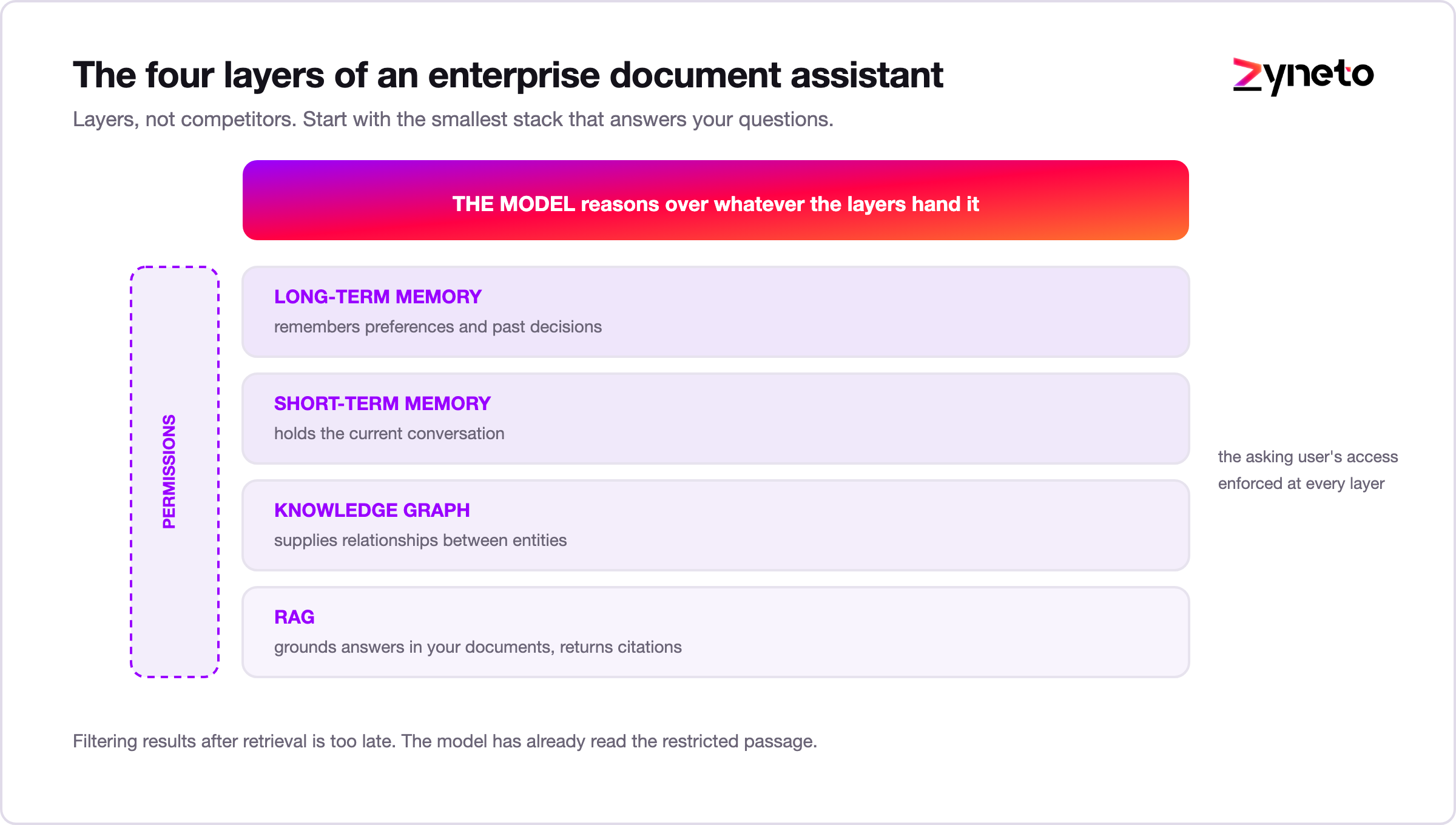
In a real build these are not competitors. They are layers. RAG grounds answers in your documents. A graph adds the relationships. Short-term memory carries the conversation, long-term memory carries the relationship. The model sits on top, reasoning over whatever the layers hand it.
Stack them, and a generic chatbot turns into something that actually knows your business, cites its work, and remembers context. Which layers you need depends on your questions and your data. The best builds start with the smallest stack that solves the real problem, then grow.
None of this is magic, and pretending otherwise sets you up to be disappointed. RAG has failure modes worth knowing before you sign anything.
Retrieval can miss. If the right passage never gets pulled, the model answers from whatever did, which may be close but wrong. Chunking decides a lot here. Slice a document badly and you split a rule from its exception, or bury the answer under noise.
Conflicting sources are another trap. Two documents disagree, the system retrieves both, and the model picks one, sometimes the outdated one. Without a way to favor the current source, the assistant sounds sure and is quietly wrong.
The index goes stale, too. Retrieval is only as fresh as your last data sync. Miss a nightly update and the assistant answers from yesterday, which matters a great deal for prices, policies, and anything legal.
And even with good retrieval, the model can overreach. Hand it five relevant passages and it may blend them into a tidy answer none of them actually support. Citations are the antidote, because a claim with no source next to it is a claim to double-check.
None of these are reasons to avoid RAG. They are reasons to build it with care: tune the chunking, favor authoritative and recent sources, keep the index in sync, and test with real questions so you catch the misses before your users do. A team that cannot name these failure modes has not shipped one in anger.
These systems pay off anywhere people burn time hunting through files and tabs for an answer.
Support agents ask the assistant instead of digging through a knowledge base, and get a reply with the source attached. Legal and compliance teams interrogate contracts and policies, including the relational questions keyword search chokes on. Sales reps pull an account's history and past proposals in seconds. Operations and HR field the same policy questions they have answered a hundred times, now instantly. Engineers query internal docs and old decisions without tapping a colleague on the shoulder.
Different departments, same payoff: less time searching, fewer confident wrong answers, and knowledge that does not walk out the door when your expert takes a new job.
The technology is the easy part. What decides whether this ships is everything around it.
Permissions come first. The assistant has to respect who can see what. Retrieval must honor each person's access, so it never surfaces a document they could not have opened themselves. Skip this and you have built a data leak with a friendly chat box.
The failure here is subtler than it sounds, and it catches experienced teams. The natural way to build a fast prototype is to index everything under one service account, then filter results by user afterwards. It works in the demo. It is also wrong, because the model has already read the restricted passage before the filter runs, and anything it saw can leak into the phrasing of an answer even when the source is hidden.
The correct shape is to carry the asking user's identity all the way down into retrieval, so restricted content is never a candidate in the first place. That is harder to build and it is the difference between a system legal will sign off and one they will not.
Two related details are worth settling early. Documents change permission over time, so the index needs to learn that a file became confidential last week. And answers get cached, which means a cache keyed only on the question will happily serve one user's permitted answer to another.
Then privacy. Sensitive and personal data needs careful handling, and plenty of organizations insist the whole thing runs in their own cloud, or on-premise, rather than shipping data to someone else's servers.
Accuracy, too. Answers should cite their sources, and the system should say "I don't have that" instead of bluffing. You also need a way to test it, so you catch it quietly breaking when a document changes or a prompt gets tweaked. Add logging and clear ownership of what it can touch. None of this is optional in an enterprise. It is the line between a demo and a deployment.
Sensible projects start small and prove themselves. Pick one high-value set of questions, wire up the data behind them, and ship a grounded assistant that cites sources with permissions enforced from day one. Watch two things: are the answers right, and do people actually use it. Then widen.
Picking a partner? Listen for what they talk about. If it is all model and no mention of permissions, accuracy, or testing, keep looking. And if your data cannot leave your walls, make sure they can build inside them. The hard part of enterprise document AI was never the model. It is the data plumbing and the guardrails, and that is where the scars show.
Budget and accuracy move together, by the way. Every answer calls a model and a search, so cost tracks usage, and answer quality tracks how carefully your documents were prepared and split. A staged rollout keeps both honest: one narrow question set, measured against real cases, retrieval tuned, then more scope and more data. Indexing everything on day one is the fastest way to a slow, pricey assistant nobody trusts.
Build the evaluation set before you build the assistant. Fifty real questions with known correct answers, gathered from the people who will use it, is enough to start. Without that, every change is a guess: someone adjusts a prompt, the answers feel different, and nobody can say whether the system got better or worse. With it, you can tune chunking and retrieval and see the score move.
That evaluation set is also the thing that catches silent decay. Documents get updated, a sync fails, an index drifts, and the assistant starts answering from stale material without any visible error. Running the same fifty questions on a schedule turns that into an alert instead of a complaint from a customer.
Not every problem needs any of this. If your knowledge is small and barely changes, a decent search box or a plain FAQ may be all you need. If a question has exactly one right answer, a rule beats a language model every time. And if the source documents are a mess, fix them first, because an assistant built on confusing content just repeats the confusion in a confident voice. Bring in RAG, graphs, and memory when the knowledge is large, moving, and worth asking about in plain language.
Making AI answer from your own data comes down to a few layers. RAG lets it chat with your documents and show its sources. A knowledge graph adds the relationships for precise questions. Short and long-term memory let it hold a conversation and stay useful over time. For an enterprise, the tech matters less than the guardrails around it. Permissions, privacy, accuracy, and governance decide whether it ever leaves the lab. Start with the smallest stack that solves your real problem, lock down access from day one, and grow from something that works. Small and trusted beats big and ignored.
If you want AI that actually knows your business and answers from your own data, Zyneto builds enterprise-grade document and knowledge AI with retrieval, knowledge graphs, memory, and the permission and accuracy checks that keep it safe. Book a free consultation and we will start with the documents your team keeps reopening.
It means using AI that answers from your own files, your policies, contracts, and product docs, rather than from the public internet. It finds the relevant passage and answers from it, usually with a citation you can check.
RAG finds the parts of your data that relate to a question and feeds them to the model as context, so it answers from your content instead of guessing. Update the assistant by updating your documents, not by retraining.
RAG changes what the model knows at answer time by handing it documents, which suits facts that change. Fine-tuning changes how the model writes and behaves. Use RAG for knowledge, fine-tuning for behavior.
When your questions are about relationships and precise facts, like which items connect to which, a graph beats text search. Plenty of systems run both together.
Short-term memory holds the current chat in the model's context window. Long-term memory stores useful facts across sessions and pulls them back later, so the assistant stays useful over time.
It can be, built right. Retrieval must respect user permissions, sensitive data needs proper handling, and many organizations run it in their own cloud or on-premise. The security lives in the design around the model.

Vikas has around fifteen years of experience building software and now builds generative AI systems at Zyneto. His work covers retrieval augmented generation, agentic AI, knowledge graphs, AI memory, and the evaluation and guardrails that decide whether any of it is safe to put in front of customers. He has shipped enterprise copilots, document AI, chatbots and predictive analytics for e-commerce, fintech and marketing teams, and works day to day in Python, JavaScript and SQL. He follows multimodal models, business process automation and enterprise AI security closely, and mentors engineers moving into AI. He writes about architecture, inference cost and the failure modes that only show up at production scale.
Share your details and we will talk soon.
Be the first to access expert strategies, actionable tips, and the trends actually shaping the digital world. No fluff - just practical insights delivered straight to your inbox.
Dive into our blog and stay ahead of the curve with expert perspectives, future-ready trends, and tech tips written for decision-makers and doers alike.