AI Copilots for Business: What They Are, How They Work, and Where They Help


An AI copilot is an assistant built into a product or workflow that helps users get a task done without leaving what they are doing. It knows the context on screen, suggests the next step, and drafts or acts on the user's behalf while they stay in control. Unlike a chatbot that waits for questions, a copilot works alongside you inside the task. This guide explains how copilots work, where they earn their keep, why many fail, and how to tell whether one fits your product or team.
The word became familiar through tools like GitHub Copilot, which reached technical preview in June 2021 and general availability a year later, and Microsoft 365 Copilot, announced in March 2023, but the idea is simple. A copilot sits inside the thing you are already using and helps you move faster. It drafts the email you were about to write, explains the record you are looking at, or suggests the code you were reaching for.
Two traits set a copilot apart, and both are worth spelling out because they are what most failed copilots get wrong.
Embedded means it lives where the work happens. Not in a separate tab, not behind a menu, not in a chat panel the user has to remember exists. If invoking the copilot costs more effort than doing the task by hand, people revert to the old habit within a week and the feature quietly dies.
Aware means it already knows what you are working on. A copilot that opens with "what would you like help with?" has pushed the work back onto the user. A good one opens knowing the record on screen, the user's role, what they did five minutes ago, and the conventions of this particular account.
A good copilot feels less like a tool you open and more like a colleague looking over your shoulder at the right moments. That feeling comes almost entirely from those two traits, and almost not at all from which model is behind it.
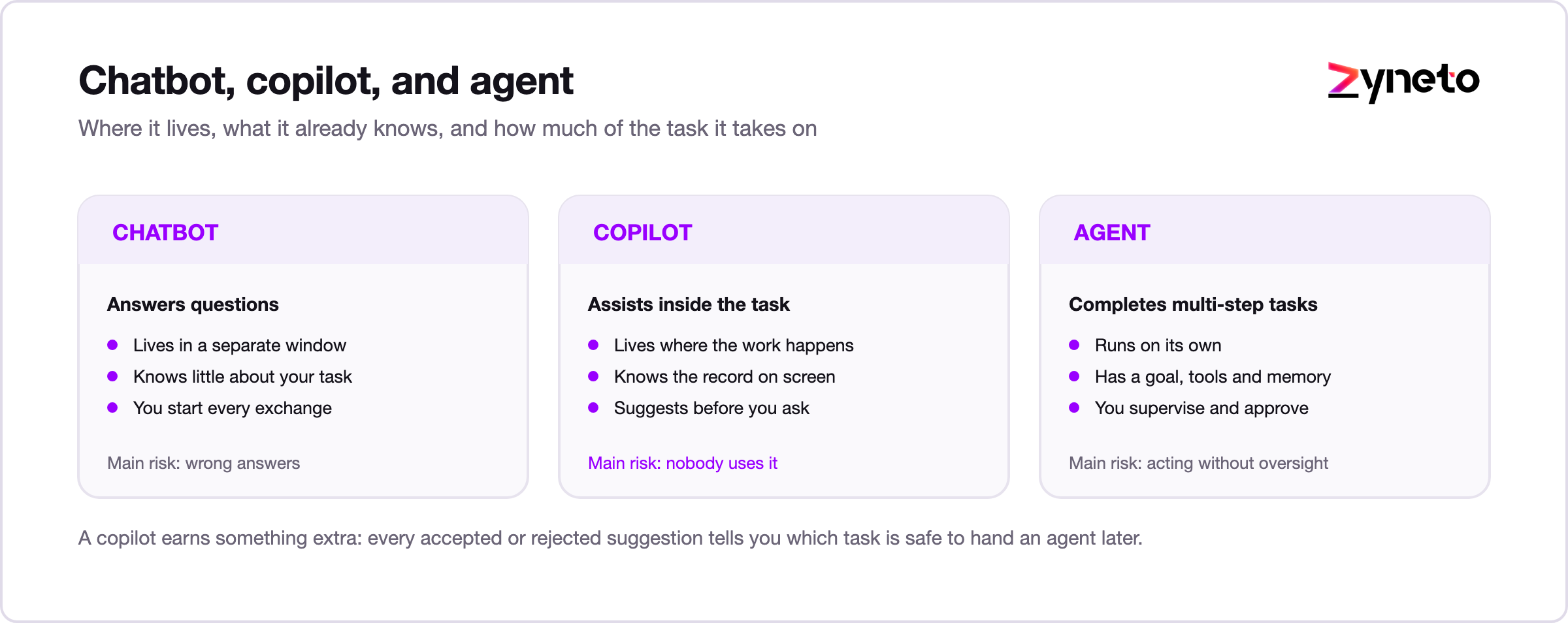
These three terms get used as if they mean the same thing. They do not, and the difference matters when you decide what to build.
Chatbot | AI copilot | AI agent | |
|---|---|---|---|
What it does | Answers questions | Assists inside a task | Completes multi-step tasks |
Context it has | Little | Knows what you are working on | Goal, tools, and memory |
Who starts | You ask | It also suggests unprompted | It runs on its own |
Your role | Ask | Accept or edit suggestions | Supervise and approve |
Example | An FAQ bot on a website | An in-app "draft this reply" | A system that resolves a ticket end to end |
Main risk | Wrong answers | Suggestions nobody uses | Acting without oversight |
A chatbot answers. A copilot assists while you stay in charge. An agent takes the wheel for a stretch and checks in at key points.
Most teams get more value sooner from a copilot than from a fully autonomous agent, because the human stays in the loop and trust builds gradually. A copilot also produces something valuable as a by-product: every accepted or rejected suggestion is a signal about what could safely be automated later. Teams that ship a copilot first usually know exactly which agent to build second. For that next step, see our guide to AI agents for business.
Under the surface, a useful copilot depends on a few moving parts.
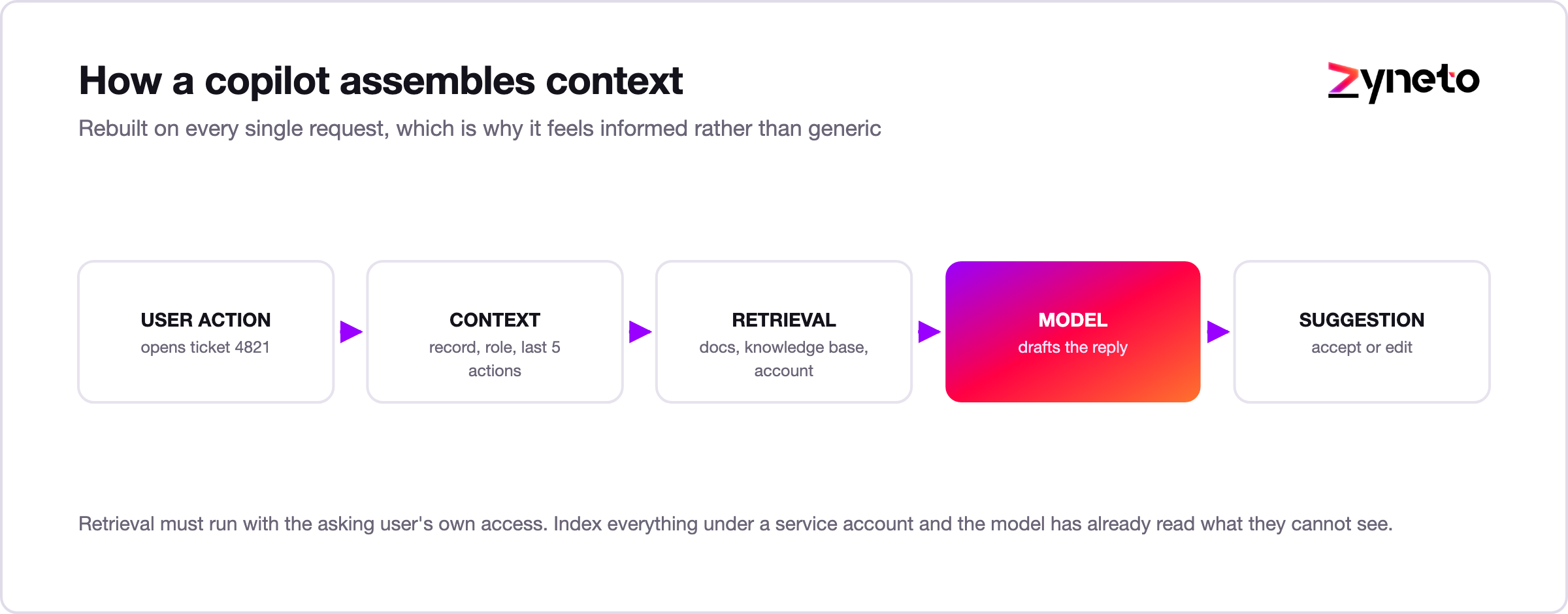
Context assembly. On every request, the copilot gathers what the user is doing: the open record, their role and permissions, recent actions, and account conventions. This is the part that makes it feel aware instead of generic.
Retrieval and grounding. The copilot pulls from your documentation, help content, and data so its answers describe your product and your account, not software in general. Without grounding, it guesses.
Suggestion and action. For each capability, the copilot either proposes something the user accepts or performs the action directly. Most start with propose-and-accept, which keeps the human in control and produces useful signal about what to automate later.
Permission inheritance. The copilot must see exactly what the current user is allowed to see, no more. This sounds obvious and is one of the most common ways copilots go wrong, because the retrieval layer is often wired up with broad service credentials for convenience during the build and never tightened afterwards.
Speed. A copilot that takes several seconds is one people stop opening. The old interface research still applies: around 0.1 seconds reads as instantaneous, 1 second keeps someone in flow, and past 10 seconds their attention has already gone somewhere else. Responsiveness is a feature here in a way it is not for background AI, so good copilots stream their answers and keep a tight response budget.
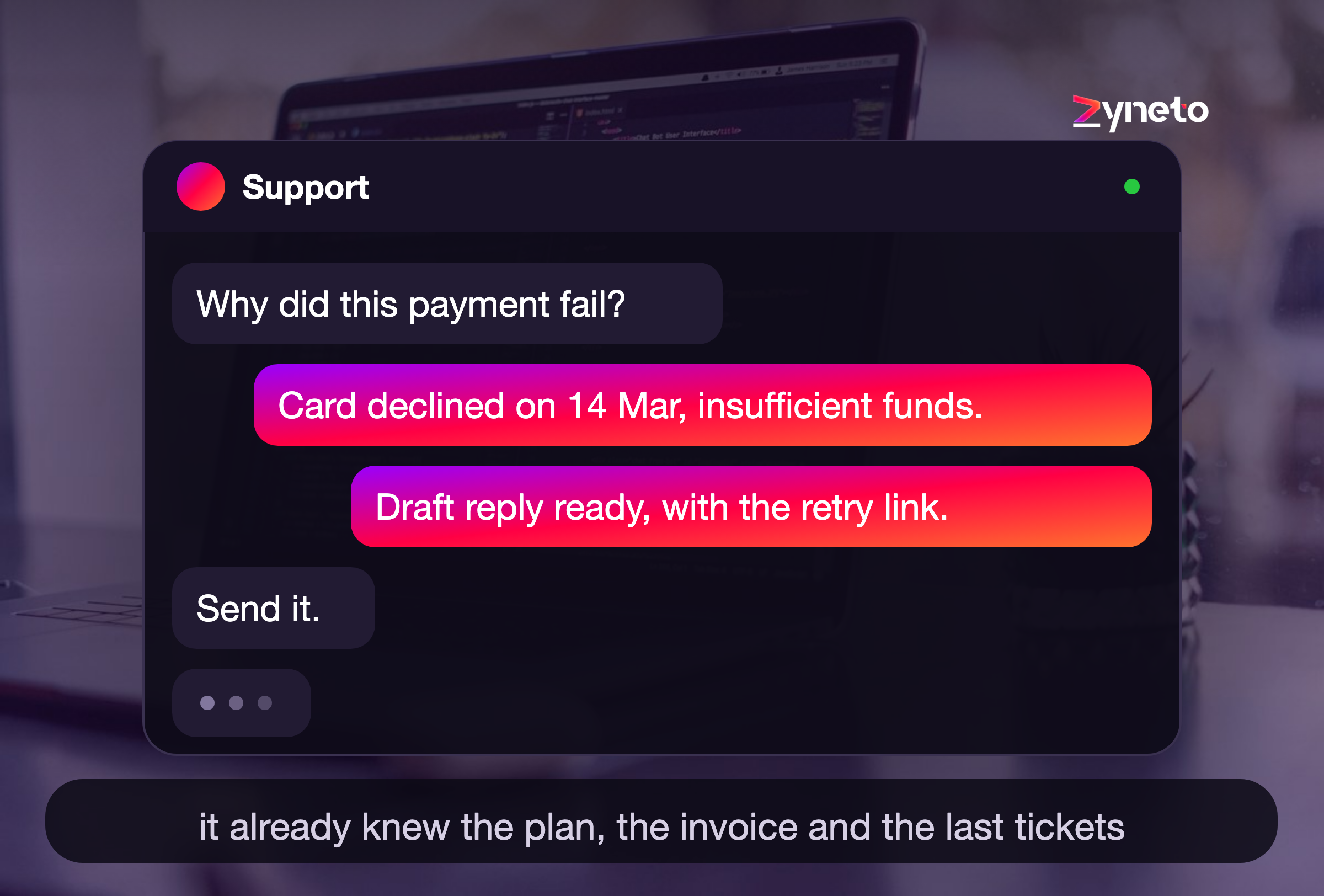
Here is a hypothetical support example. An agent opens a ticket about a failed payment.
The copilot already sees the customer's plan, their recent invoices, and their last few tickets. It drafts a reply that names the exact failed charge, suggests the fix, and links the source it used. The agent reads it, changes one line, and sends. No searching, no switching tabs.
Now count what did not happen. The agent did not open the billing system. They did not scroll a ticket history. They did not paste anything into a separate window and ask it to summarize. Each of those is thirty seconds, and thirty seconds times a few hundred tickets a day is the whole business case.
That is the difference context makes, and it is why the plumbing matters more than the model.
Copilots pay off where a task is frequent, involves some judgment, and slows people down with lookups or blank-page work.
A copilot inside the CRM drafts follow-up emails, summarizes an account before a call, and suggests the next best action based on the deal stage. Reps spend less time on admin and more on selling. The pre-call summary is usually the feature that wins the team over, because it replaces a task most reps were skipping anyway.
Agents get suggested replies drawn from the knowledge base, a summary of the ticket history, and a draft resolution they can edit and send. Response times drop and answers stay consistent across a team, which matters more than raw speed for customer perception.
Developers get code suggestions in the editor, plain-language explanations of unfamiliar code, and help writing tests. The gain is momentum, since the copilot keeps them in flow instead of switching to search. Explaining unfamiliar code is the underrated one: it is how new joiners get productive in a large codebase without interrupting someone senior.
A copilot lets someone ask for data in plain language and get a chart or a summary back, without writing a query. It turns a dashboard into something a non-analyst can actually interrogate, which reduces the queue of small requests sitting on the data team.
A copilot embedded in the intranet answers policy questions with a link to the source, helps managers draft reviews against your competency framework, and walks new joiners through onboarding steps. Grounding matters more here than anywhere: an HR copilot that invents a policy is worse than no copilot at all.
Permissions also bite hardest in this function. Salary bands, performance notes and disciplinary records sit in the same systems as the harmless policy documents, and a copilot that retrieves across all of it without inheriting the asking user's access will eventually surface something it should not.
A pattern worth noticing across all five functions: the winning capability is rarely the flashiest one. It is usually whichever task people were quietly skipping because it took too long, like the pre-call summary in sales or the code explanation in engineering. Look for the corners people cut, not the work they already do well.
The return comes from three places.
Time saved is the obvious one. A copilot removes the lookups, the context switching, and the blank-page starts that quietly eat a workday.
Faster ramp is the quieter win. New employees lean on a copilot to learn a product or a process, so they become productive sooner and ask fewer repetitive questions. In teams with high turnover this is often the larger number, though it rarely makes it into the business case.
Consistency is the third. When the copilot drafts from your approved knowledge, answers and outputs vary less across a team, which shows up in quality and in customer experience.
To build a case, pick one high-frequency task, measure how long it takes today, and estimate how much of it a copilot removes. A clear result on one workflow makes the argument for the next.
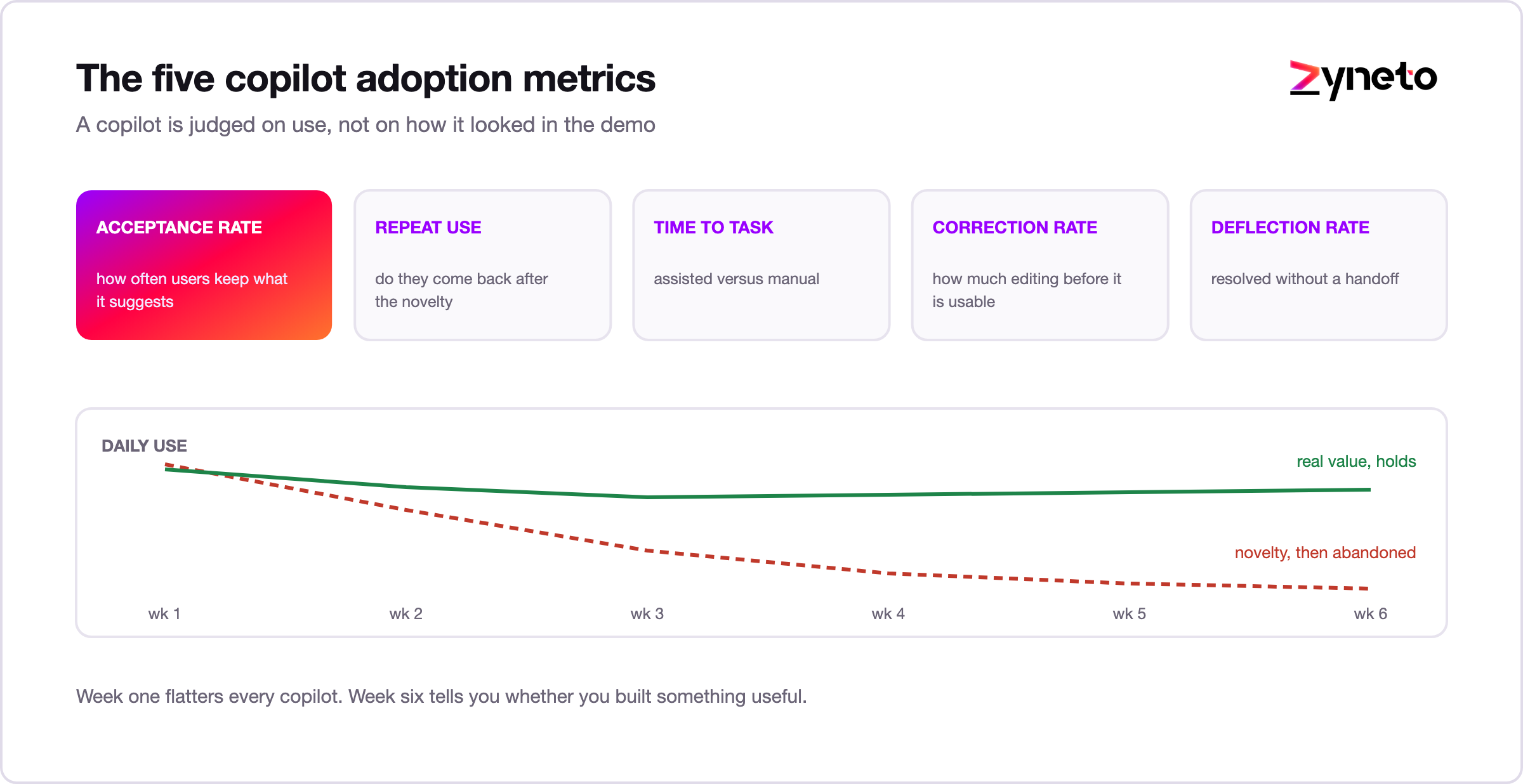
A copilot is judged on use, not on how it looked in the demo. A few numbers tell the real story.
Track these per capability, not just per product. One part of a copilot can be loved while another is ignored, and the average hides that.
Watch the trend rather than the launch number. Almost every copilot sees a spike of curiosity in week one. What matters is week six, when the novelty is gone and only genuine usefulness keeps people coming back.

Most copilots that disappoint do not give bad answers. They give reasonable answers nobody asks for. That happens for predictable reasons.
A copilot is not always the answer. If a task happens rarely, the effort to build and maintain the feature will not pay back. If a simple button or a fixed automation does the job, use that instead of a language model. And for decisions with heavy legal or safety weight, keep a person clearly in charge rather than nudging them toward an AI suggestion.
Reach for a copilot when the work is frequent, involves judgment, and benefits from context. When you are unsure, ship a small pilot on one workflow and let the acceptance rate settle the question, rather than debating it in a meeting.
Building a copilot that people keep using is more of a product problem than a model problem. The questions that decide success come early: where does it live, how is it invoked, what does it already know, and what does it suggest before being asked. After that come the engineering concerns of context, retrieval, latency, and permissions.
A sensible build order looks like this. Pick one workflow and one capability. Wire the context properly for that single case, even though it feels narrow. Ship it to a small group with instrumentation from day one. Watch acceptance rate for a few weeks. Only then add the second capability, and only if the first one earned its place.
The temptation is always to launch with breadth so the demo looks impressive. Breadth is what makes copilots forgettable.
Two engineering decisions deserve attention early, because they are expensive to change later.
The first is where context is assembled. If every capability builds its own context in its own way, you end up with five slightly different notions of "what the user is doing" and no single place to fix a bug. Build one context layer and have every capability draw from it.
The second is how permissions flow. The shortcut during a build is to give the retrieval layer broad credentials so everything works, and to filter results afterwards. That shortcut tends to survive into production, and it means the copilot has technically already read data the user cannot see. Wire the user's own access down into retrieval from the first commit, and the problem never exists.
Budget for maintenance too. A copilot is coupled to your product, your permissions model, and your documentation. All three change. A copilot nobody has touched in six months is usually a copilot quietly giving stale answers, which erodes trust faster than a wrong answer on day one.
If you are evaluating a partner, look for a team that talks about adoption and acceptance rate, not just accuracy, and that can explain how they will keep responses fast and permission-aware. Ask them what they would cut from the first release. A team that cannot answer that has not built one that survived contact with real users.
Zyneto's AI copilot development work is built around exactly those constraints, with instrumentation so you can see whether people are using it within weeks rather than guessing.
The line between copilots and agents is blurring. Copilots are starting to take longer chains of action on the user's behalf, still checking in at the decision points that matter. Expect them to move from suggesting one step to handling a short sequence, with the person approving rather than doing.
The interesting consequence is that the approval interface becomes the product. When a copilot proposes three linked actions instead of one sentence, how it shows you what it is about to do, and how easily you can change part of it, decides whether anyone trusts it.
Teams that ship a focused copilot now will be ready for that shift, because the hard parts, context and trust, are the same either way.
An AI copilot is an in-product assistant that helps users get work done without leaving the task, aware of context and keeping the human in control. It sits between a chatbot that only answers and an agent that acts on its own.
Copilots pay off on frequent, judgment-heavy work in sales, support, engineering, operations, and internal enablement. They fail when they are slow, contextless, permission-blind, or measured on the demo instead of on real use. Acceptance rate in week six, not week one, is the number that tells you the truth.
Start with one high-frequency task, keep a person in the loop, and judge it on whether people keep using it.
Thinking about adding a copilot to your product or stack? Talk to Zyneto about AI copilot development and we will help you scope one that people actually adopt.
It is an assistant built into a product that helps you finish a task without leaving it. It knows what you are working on and suggests or drafts the next step while you stay in control.
A chatbot answers questions in a separate window. A copilot works inside your task, already knows the context, and can suggest actions before you ask.
A copilot assists while the human stays in charge of each step. An agent completes multi-step tasks on its own and checks in at key points. Copilots keep a tighter human loop.
Drafting sales follow-ups in a CRM, suggesting support replies, code suggestions for developers, letting non-analysts query data in plain language, and answering HR policy questions with sources.
By adoption, mainly acceptance rate, meaning how often users keep the suggestions it makes. Check it at week six rather than week one, once the novelty has worn off.
The model is the easy part. The hard part is product design and engineering: placing it well, giving it context, keeping it fast, and respecting permissions. That is what determines whether people keep using it.
Usually a copilot. It keeps a human in the loop while trust builds, and every accepted or rejected suggestion tells you which task is safe to hand to an agent later.

Vikas has around fifteen years of experience building software and now builds generative AI systems at Zyneto. His work covers retrieval augmented generation, agentic AI, knowledge graphs, AI memory, and the evaluation and guardrails that decide whether any of it is safe to put in front of customers. He has shipped enterprise copilots, document AI, chatbots and predictive analytics for e-commerce, fintech and marketing teams, and works day to day in Python, JavaScript and SQL. He follows multimodal models, business process automation and enterprise AI security closely, and mentors engineers moving into AI. He writes about architecture, inference cost and the failure modes that only show up at production scale.
Share your details and we will talk soon.
Be the first to access expert strategies, actionable tips, and the trends actually shaping the digital world. No fluff - just practical insights delivered straight to your inbox.
Dive into our blog and stay ahead of the curve with expert perspectives, future-ready trends, and tech tips written for decision-makers and doers alike.