Ecommerce Replatforming: When To Move, And How Not To Lose Your Traffic


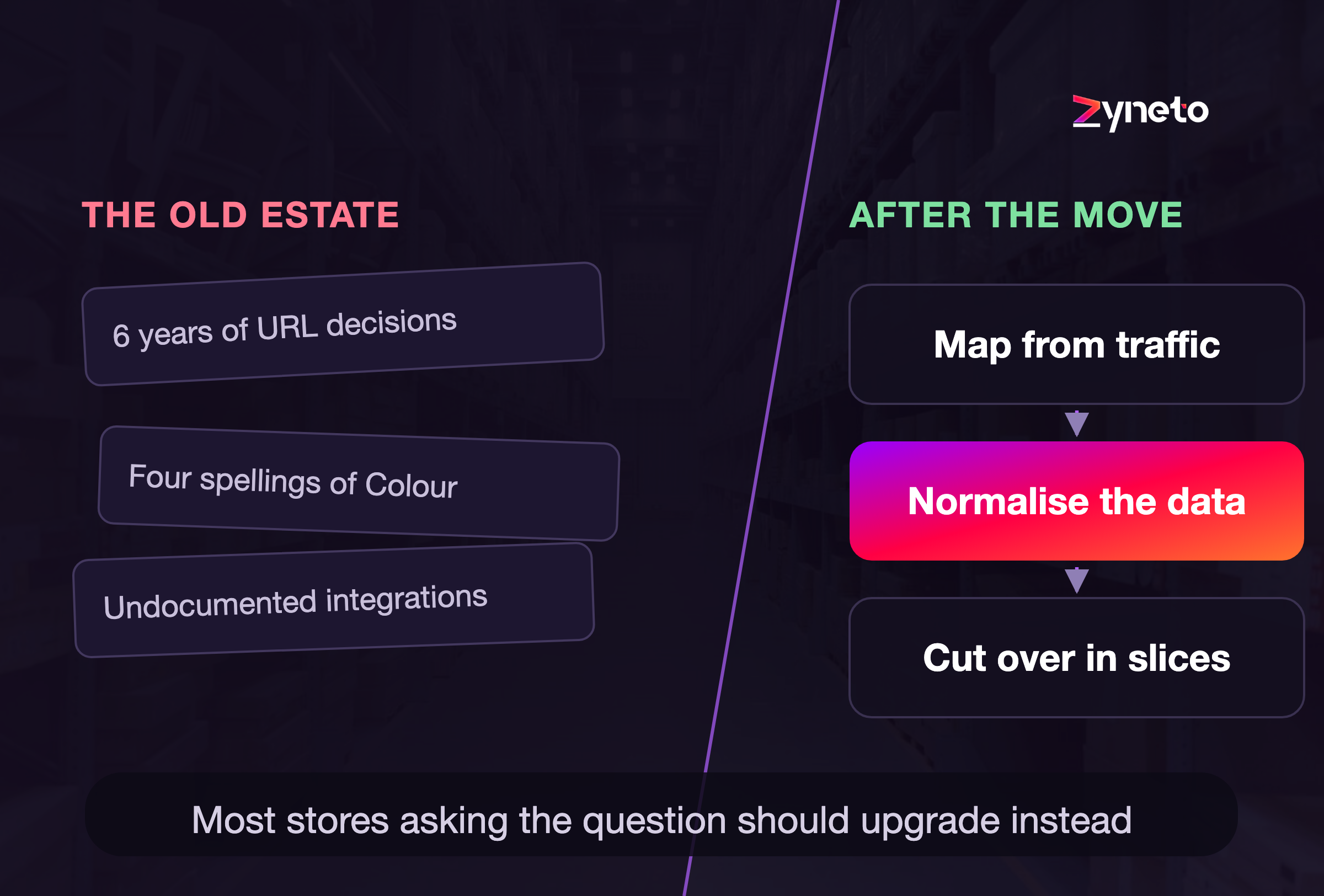
Most replatforming projects are decided in the wrong order. Somebody books demos, falls for a feature, and picks a platform. Then the team spends nine months discovering that the feature was never the problem.
The problem was usually the product data, the integrations nobody documented, or a URL structure that six years of merchandising decisions had quietly turned into a swamp.
This piece is about doing it in the right order. It covers when a replatform is genuinely justified, when an upgrade gets you the same outcome for a fraction of the money, what the move actually costs once you count the parts that never appear on a licence quote, and how to come out the other side with your organic traffic intact.
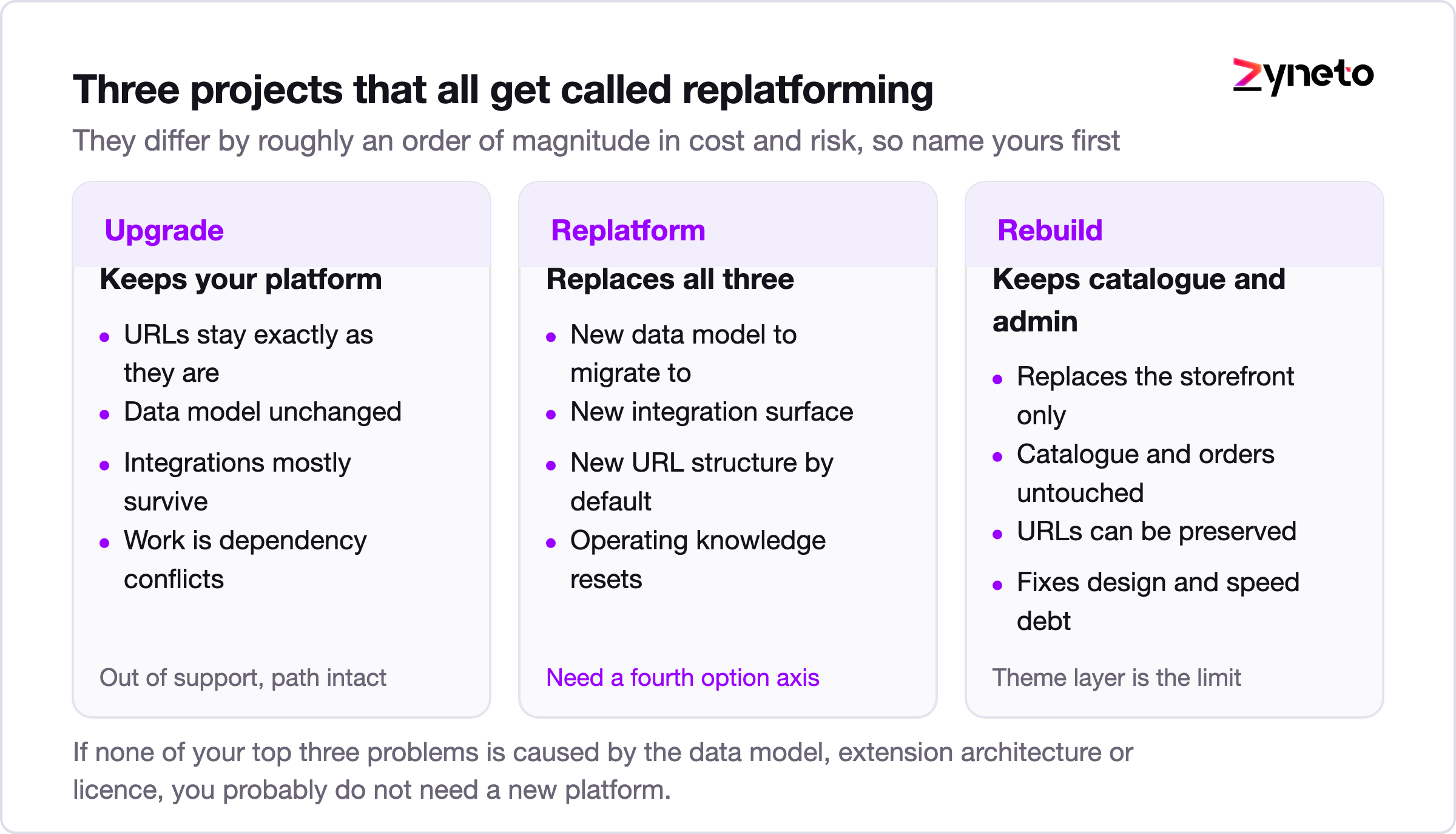
There are three different projects that all get called replatforming, and confusing them is where budgets go to die.
An upgrade keeps your platform and moves you to a supported version. Your URLs stay. Your data model stays. Your integrations mostly stay. Most of the work is dependency conflicts and custom code that was written against internal APIs it should never have touched.
A replatform moves you to a different platform. New data model, new admin, new URL structure unless you fight for the old one, new integration surface. Everything your team knows about operating the store becomes partly wrong.
A rebuild keeps the platform and replaces the storefront, usually to fix performance or design debt. Your catalogue, orders and admin survive intact.
These are not variations on one theme. They differ by roughly an order of magnitude in cost and risk, and the honest first question is which one you need. Plenty of teams describe symptoms that point squarely at a rebuild and then go shopping for a new platform, which is how a six week performance problem turns into a nine month migration.
A useful test: write down the three things that are actually hurting the business right now. If none of them are caused by the platform's data model, its extension architecture, or its licence terms, you probably do not need a new platform.
Start with the reasons that hold up.
Your version is out of support and the upgrade path is broken. Adobe's own release notes put regular support for the 2.4.6 line at 11 August 2026, with 2.4.5 extended support ending the same day. Newer lines run longer, with 2.4.7 supported to 9 April 2027 and 2.4.8 to 11 April 2028. Running unsupported software is a real risk, because you stop receiving security patches for a system that handles card data. But note what this justifies. It justifies getting to a supported version. It only justifies a replatform if the upgrade itself has become impossible, which usually means heavily customised core code.
The data model cannot represent what you sell. This is the strongest reason on the list and the most commonly missed. If your platform caps you at three product options and you sell apparel with size, colour, fit and inseam, no amount of configuration fixes that. Shopify raised the variant ceiling to 2,048 per product in late 2025, which helped a lot of catalogues, but the limit of three options per product did not change. A store that needs a fourth axis is fighting the platform every day, and that fight compounds.
Total cost of ownership has inverted. When your annual spend on maintaining extensions, hosting and specialist contractors exceeds what an equivalent managed platform would cost outright, the maths has already made the decision.
You cannot hire for it. A stack that only three contractors in your market understand is a business continuity problem, not a technology preference.
A commercial model change the platform cannot absorb. Moving from single brand D2C to a multi vendor marketplace, or adding B2B with customer specific pricing and credit terms, changes what the system has to be. Sometimes that is genuinely a new system.
Now the reasons that do not survive scrutiny.
The site is slow. Sometimes the platform is at fault. More often it is a page weighted down by eleven marketing tags, unoptimised images and a theme doing database queries in a loop. Measure first. Google's Core Web Vitals thresholds give you a concrete target, with Largest Contentful Paint at 2.5 seconds or better and Interaction to Next Paint at 200 milliseconds or better, and Interaction to Next Paint replaced First Input Delay back in March 2024, so if your monitoring still reports the old metric it is out of date. A replatform to fix speed you have never actually diagnosed is an expensive guess.
The admin is ugly. Retraining is cheaper than migration by a factor of about fifty.
A competitor moved. Their constraints are not yours.
One department wants a feature. Price the feature as an integration before you price it as a platform.
Platform licence is the number everyone quotes and the smallest line in the budget. Here is what sits underneath it.
Data migration. Products, categories, customers, order history, reviews, and the mapping between the old identifiers and the new ones. Order history is the sleeper. Merchants assume it comes across; often it arrives as flat records with no ability to reorder, return or refund against them, which lands on the support team on day one.
Integration rework. Every connected system needs its connection rebuilt and retested: ERP, warehouse, point of sale, tax engine, payment gateway, marketing automation, reviews, subscriptions, loyalty. Count them honestly. Most merchants underestimate this list by about half, because the ones that break are the quiet ones nobody has touched in three years.
Theme and frontend. A new platform means a new storefront build. Design carry over is never as clean as it looks in a demo.
Content and SEO. The redirect map, metadata carry over, structured data, and the internal link graph.
Training and process change. Your merchandisers, support team and finance team all learn a new tool while still running the business.
Parallel running. For a period you pay for both platforms. Budget for a longer overlap than you plan, because the pressure to switch off the old system early is exactly when mistakes happen.
A reasonable planning assumption for a mid market store is that the licence is somewhere between a tenth and a fifth of the first year total. If your business case does not include the six lines above, it is not a business case yet.
This is the part that determines whether you keep your organic traffic, and it is the part most often assigned to whoever is free in week nine.
Google's own site move documentation is unusually direct about the mechanics. Permanent redirects do not cause a loss in PageRank. You should still expect temporary ranking fluctuation while Google recrawls and reindexes, with a medium sized site typically taking a few weeks for most pages to settle and larger sites taking longer. And the instruction that catches people out: keep the redirects live for at least 180 days. After that window Google no longer recognises a relationship between the old and new URLs, and treats the old ones as unrelated.
That last point deserves emphasis. Redirects are not a launch task you complete and remove. They are infrastructure you carry for at least six months, and on a large store, longer.
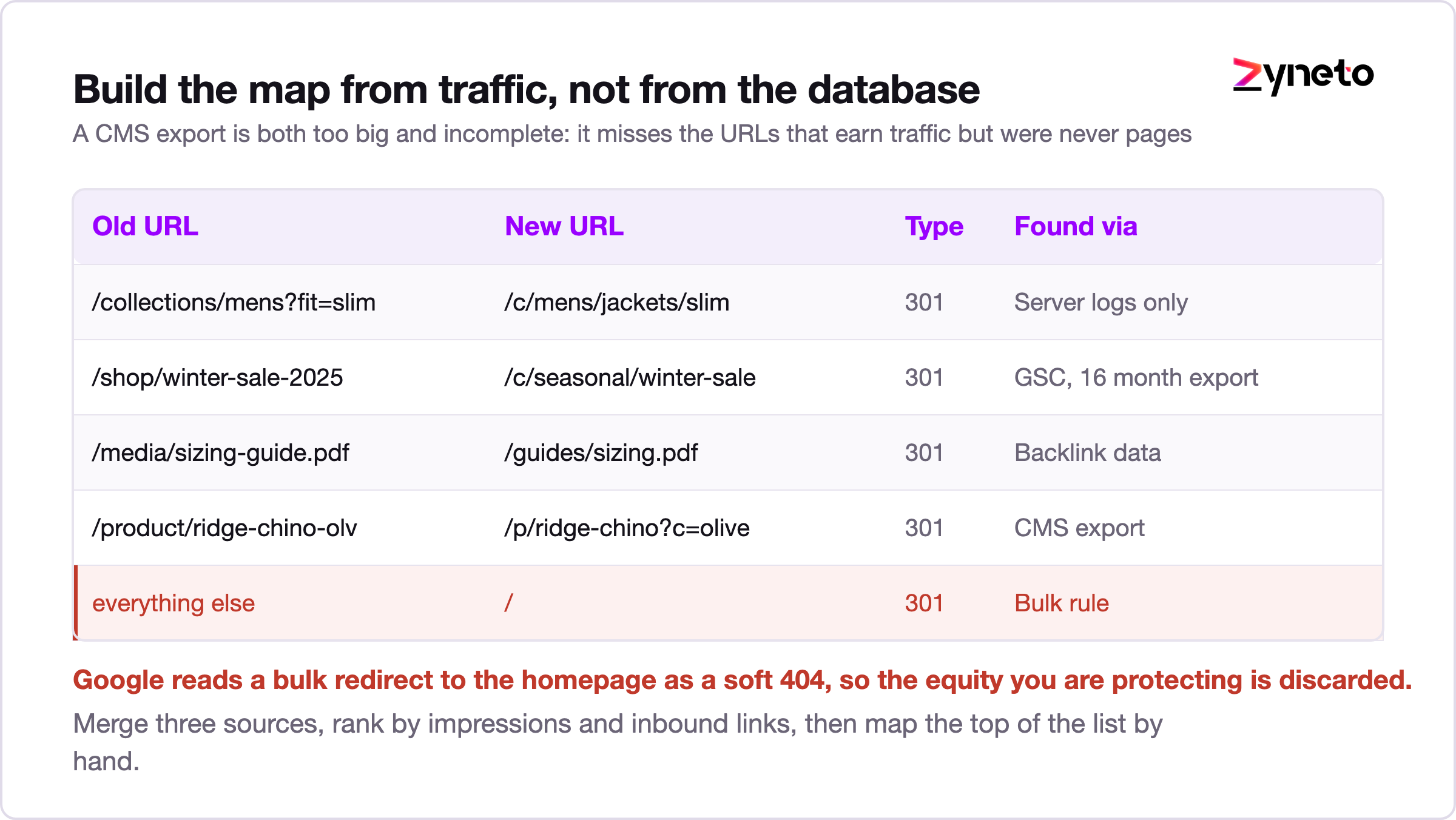
The common mistake is exporting every URL from the old CMS and mapping them one to one. That map is both too big and incomplete. Too big, because a decade old store carries thousands of URLs that no human or crawler has requested in years. Incomplete, because it misses the URLs that earn traffic but were never CMS pages: faceted filter combinations that picked up links, campaign landing pages, old blog posts on a subdomain, PDFs.
Build the map from three sources instead, and merge them.
Rank the merged list by impressions and inbound links, then map the top of it by hand. The tail can go to a category level redirect. What must never happen is a bulk redirect of everything to the homepage, which Google treats as a soft 404 and which throws away the equity you are trying to keep.
Crawl the staging site and compare it against the production crawl. You are looking for four things: pages present in production and missing in staging, redirect chains longer than one hop, canonical tags pointing at the old domain, and a noindex left behind from the staging environment. That last one takes down more launches than every other cause combined, and it is trivially preventable with a pre release check that fails the deploy if a noindex is present on a template that should be indexable.
Also confirm your structured data survived. Product markup with price and availability drives rich results, and a template rewrite silently drops it more often than you would expect.

Ask a team how long migration will take and they will estimate the build. The build is usually not what slips.
What slips is the discovery that your catalogue contains four spellings of "Colour", three unit conventions for weight, and a "size" attribute holding values like L, Large, large, L/G and 42. None of that mattered on the old platform, because the old platform never enforced anything. The new one will.
Normalising a catalogue is slow, manual, and mostly cannot be parallelised, because the decisions have to be consistent. It is also the work that determines whether search, filtering and merchandising function on the new store. A migration that ships on time with unnormalised data has not saved any time; it has moved the cost to the merchandising team and made it permanent.
Two things help. First, start the data work before you select the platform, since it is valuable regardless of where you land. Second, treat the export as a product with acceptance criteria: every product has a category, a primary image, a normalised attribute set, and a stable identifier that maps to the old one. Run those as automated checks over the export file, and run them nightly, so the data quality trend is visible rather than discovered in user acceptance testing.
If your catalogue runs past roughly fifty thousand SKUs or you sell the same products through several channels, this is the point where a product information management layer stops being overhead and starts being the thing that makes the migration finite.
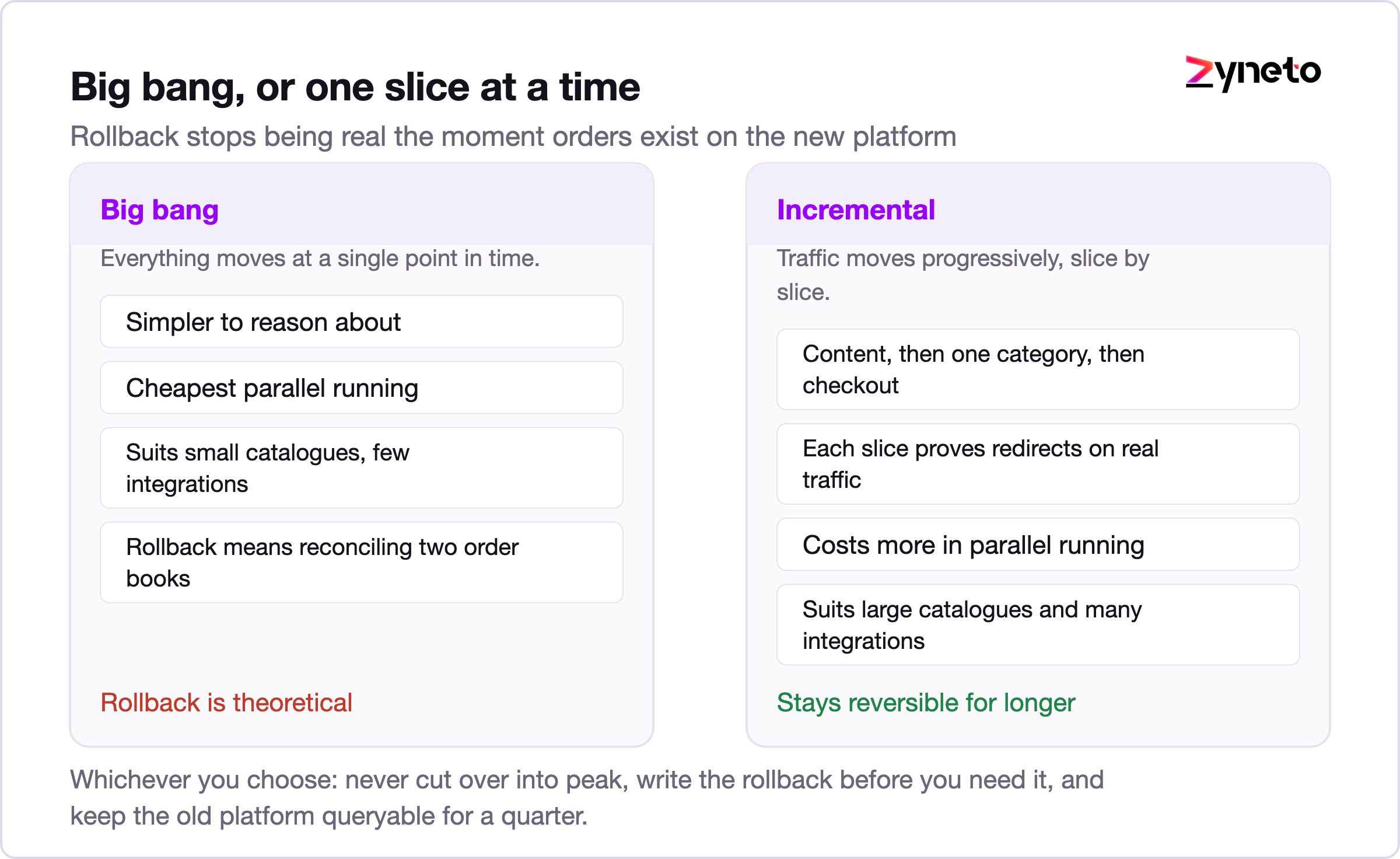
Big bang moves everything at a single point in time. It is simpler to reason about, cheaper in parallel running, and appropriate for smaller catalogues with few integrations. Its weakness is that rollback is theoretical. Once orders have been taken on the new platform, going back means reconciling two order books by hand.
Incremental, sometimes called the strangler pattern, routes traffic progressively. You might move the blog and content pages first, then one category, then checkout. Each slice proves the redirect handling, the analytics and the payment path on real traffic before the next one follows. It costs more in parallel running and routing complexity, and it is the right call when the catalogue is large, when integrations are numerous, or when an outage would be materially expensive.
Whichever you choose, three rules apply.
Never cut over into peak. If a meaningful share of your annual revenue lands in a six week window, code freeze well before it and migrate after. The retail calendar is not negotiable and the migration date is.
Write the rollback procedure before you need it, and make sure somebody who is not the lead engineer can execute it. A rollback plan that depends on one person being awake is not a plan.
Keep the old platform readable for at least a quarter. Not serving traffic, just queryable. Finance will ask a question about an order from four months ago, and the answer needs to exist.
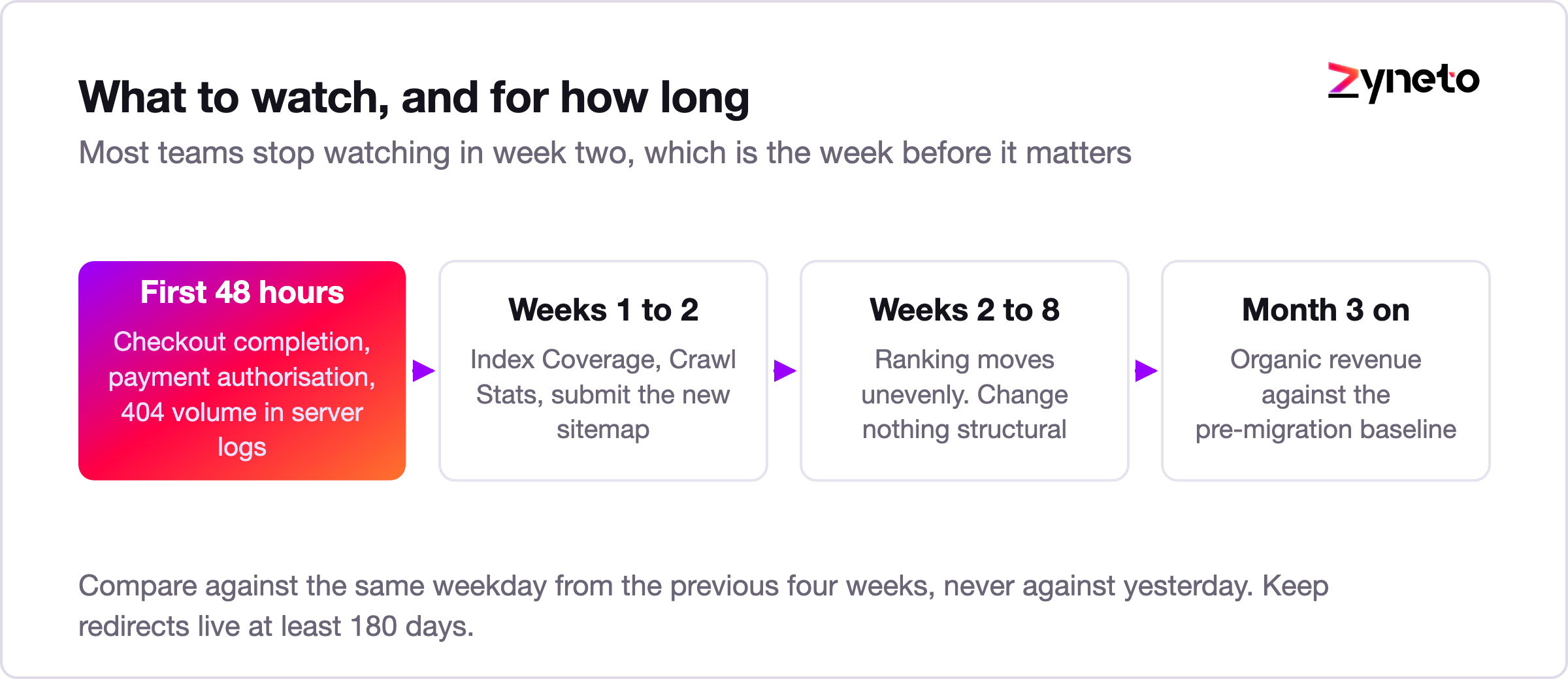
First 48 hours. Watch conversion rate, checkout completion and payment authorisation rate, compared against the same weekday from the previous four weeks rather than against yesterday. Watch 404 volume in your server logs, because that is where a bad redirect map shows up first, hours before it shows up in Search Console. Watch order confirmation email delivery, which breaks quietly and constantly.
First two weeks. In Search Console, the Index Coverage report tells you whether the new URLs are being discovered and the Crawl Stats report tells you whether Googlebot is spending its budget on redirects instead of pages. Submit the new sitemap. Keep the old one available for a while, since it helps Google find the redirects.
Weeks two to eight. Expect ranking movement, and expect it to be uneven. Some pages recover in days, some take weeks. This is the window where nervous teams start making changes, which is the worst possible response, because you lose the ability to attribute cause. Change nothing structural unless something is measurably broken.
Month three onward. Compare organic sessions and revenue against the pre migration baseline, seasonally adjusted. If you did not capture that baseline before the move, you have no way to answer the only question the board will ask.
And keep those redirects. Six months minimum, per Google's own guidance, and longer for any URL still receiving traffic.
For a mid market store, roughly ten to fifty thousand SKUs and five to ten integrations, a realistic shape looks like this.
Discovery and data audit, three to five weeks. Integration inventory, catalogue profiling, URL and traffic analysis, and the decision on which of the three projects you are running. This phase pays for itself by killing bad projects early.
Data normalisation, four to ten weeks, running in parallel. Length depends almost entirely on how bad the attribute data is, which is why the audit comes first.
Build and integration, eight to sixteen weeks. Storefront, admin configuration, and each integration rebuilt and tested against a real endpoint rather than a mock.
User acceptance and dress rehearsal, three to four weeks. Run at least one full cutover rehearsal against a production sized data set, timed. If the rehearsal takes eleven hours, your maintenance window is not four.
Cutover and hypercare, four to six weeks. Extra support cover, daily monitoring, and a named person watching the search data.
That totals five to nine months for most mid market stores. Teams that quote three months are either working with a very clean catalogue or have not yet found the integrations.
The timeline compresses in exactly one way, and it is not by adding developers. It compresses by reducing scope: migrate the store, and resist the urge to redesign, rebrand and add three new features while you are in there. Every one of those decisions extends the window in which two systems are true at once, and that window is where the risk lives.

The cheapest migration is the one you scope honestly. Most stores that ask whether they should replatform would be better served by an upgrade, a frontend rebuild, and a serious month spent on product data. The ones that genuinely need to move usually know why, and can name the specific constraint the current platform imposes. That constraint is what should shape the ecommerce app development scope, not the demo that impressed somebody.
If you cannot name that constraint, the project is not ready. Go and find it first, because it is the thing that will decide the platform anyway.
For a mid market store with ten to fifty thousand SKUs and five to ten integrations, five to nine months end to end is realistic. Discovery and data audit take three to five weeks, data normalisation four to ten weeks in parallel, build and integration eight to sixteen weeks, testing three to four weeks, then cutover and hypercare four to six weeks. Projects quoted at three months usually have either an unusually clean catalogue or an integration list that has not been finished.
Expect temporary fluctuation, not permanent loss, provided the redirects are correct. Google states that permanent redirects do not cause a loss in PageRank, and that a medium sized site typically takes a few weeks for most pages to settle in the index. Lasting damage comes from specific mistakes: bulk redirecting to the homepage, redirect chains, a `noindex` left on from staging, or dropping URLs that had inbound links. Build the URL map from server logs, Search Console and backlink data rather than from a CMS export.
At least 180 days, which is Google's stated guidance, and longer for any URL still receiving traffic. After that window Google stops recognising a relationship between the old and new URLs. Treat redirects as infrastructure you maintain, not a launch task you complete and remove.
Often, yes. An upgrade keeps your URLs, your data model and most of your integrations, so it costs a fraction of a migration. Replatforming is justified when the data model genuinely cannot represent what you sell, when the total cost of maintaining the current stack has overtaken the alternative, when you cannot hire for the technology, or when the commercial model has changed. Being out of support justifies getting to a supported version; on its own it does not justify changing platform.
You need to get to a supported version. Adobe's released versions documentation puts regular support for the 2.4.6 line at 11 August 2026, with 2.4.7 supported to 9 April 2027 and 2.4.8 to 11 April 2028. Whether that means upgrading within Adobe Commerce or moving elsewhere depends on how much of your core has been customised and what your extension estate looks like. Heavy core customisation is what usually turns an upgrade into a migration.
Product data normalisation and integration rework, in that order. Catalogues that worked fine on a permissive platform turn out to hold inconsistent attribute values, mixed units and duplicate option names, and cleaning that up is slow manual work that cannot be parallelised. Integration counts are typically underestimated by about half, because the connections that break are the quiet ones nobody has touched in years.

Vikas has around fifteen years of experience building software and now builds generative AI systems at Zyneto. His work covers retrieval augmented generation, agentic AI, knowledge graphs, AI memory, and the evaluation and guardrails that decide whether any of it is safe to put in front of customers. He has shipped enterprise copilots, document AI, chatbots and predictive analytics for e-commerce, fintech and marketing teams, and works day to day in Python, JavaScript and SQL. He follows multimodal models, business process automation and enterprise AI security closely, and mentors engineers moving into AI. He writes about architecture, inference cost and the failure modes that only show up at production scale.
Share your details and we will talk soon.
Be the first to access expert strategies, actionable tips, and the trends actually shaping the digital world. No fluff - just practical insights delivered straight to your inbox.
Dive into our blog and stay ahead of the curve with expert perspectives, future-ready trends, and tech tips written for decision-makers and doers alike.