React Native App Development: What You Are Signing Up For in 2026


React Native is the right choice for most product apps in 2026 when 3 things are true: the app is mostly screens of forms, lists and transactions, your team already writes React, and you keep at least 1 engineer who can read Swift and Kotlin. It is the wrong choice when the product is a custom renderer, lives on 1 platform, or is mostly glue around third-party native SDKs. Everything else is detail hanging off those 3.
Most comparisons start in the wrong place, on rendering benchmarks and code sharing percentages. The thing that decides whether React Native was a good call shows up in month 8, not month 1. React Native has shipped a new minor version every 60 days on average since October 2024, and only the latest 3 receive fixes. Google Play has required every app update to target Android API 36 since 31 August 2026, and the official React Native template did not target 36 until version 0.81. The failure is ordinary: an app generated in mid 2025 that shipped on time, sat untouched, and now cannot ship a 1 line Android fix until someone raises its target SDK and retests every native library, work nobody budgeted for.
So the decision is less about the framework than about whether you will pay to keep it current. This post puts numbers on that.
React Native today is a different framework from the one most comparisons describe. Any comparison written before late 2024 describes the old bridge, an asynchronous message queue between JavaScript and native code. That bridge is gone from new apps.
The New Architecture became the default in 0.76, released 23 October 2024. The legacy architecture was frozen in 0.80 in June 2025, could no longer be switched on from 0.82 in October 2025, and its code started being deleted in 0.84 in February 2026. If a vendor proposes a React Native build in 2026 and talks about the bridge, they are describing a system you cannot ship.
Hermes is the JavaScript engine, and has been since 0.70 in September 2022. It compiles your JavaScript to bytecode at build time, so the phone does not parse source on launch. Hermes V1 became the default on both platforms in 0.84. The React Native team has said the ahead-of-time native compilation work known as Static Hermes is still in testing, and nothing published since October 2025 changes that, so do not plan around it.
The official docs now recommend a framework. The environment setup page at reactnative.dev recommends starting new apps on a framework such as Expo, which supplies routing, native API access and dependency management, and warns that going without one means building those pieces yourself. That recommendation matters more than it sounds, and we come back to it below.
The current stable release is 0.87, first published 11 August 2026, with 0.88 in release candidates. The minimum targets for 0.87 are iOS 15.1 and Android 7 (API 24), read from the 0.87 source rather than from a blog post.
On 10 September 2026, Shopify announced it is moving its mobile apps back to Swift and Kotlin. This is the company most often cited as proof that React Native works at scale. They standardised on it in January 2020, moved every app to it by the end of 2023, and in January 2025 reported sub 500 millisecond P75 screen loads and crash free rates above 99.9 per cent. If you are a CTO deciding on React Native this quarter, someone on your board has already forwarded you the headline.
Their stated reason is not that React Native failed. Mustafa Ali's post says React Native was working well and still calls it an excellent framework. The reason is economic: coding agents have cut the cost of building every feature twice, once per platform, to the point where Shopify no longer needs a shared codebase to keep iOS and Android in step. The Shop app went from proof of concept to production on native in 12 weeks. The main Shopify app, with more than 300 screens, follows later in 2026.
Notice what that argument assumes. It assumes engineers who can review native code on both platforms, an internal agent pipeline with its own tests, visual review and code review gates, and an engineering organisation large enough to absorb the cost of rebuilding a 300 screen app while running the old one. Shopify built exactly that system and named it. Count how many of those you have.
The useful lesson is narrower. The economics of cross-platform frameworks rest on the cost of writing code twice. That cost is falling. For a team of 4 to 8 engineers without a native specialist on each platform, it has not fallen to zero, because what is expensive is not typing the second implementation. It is knowing which platform rule it just broke. Revisit the decision every year rather than treating it as permanent, which is the real thing Shopify did.
Decide on the screens, not on the framework. List every screen in the first release and mark what each one actually does. If most of them are forms, lists, feeds, search, a cart and an account page, React Native renders them as the platform's own native views, not as a web page in a wrapper.
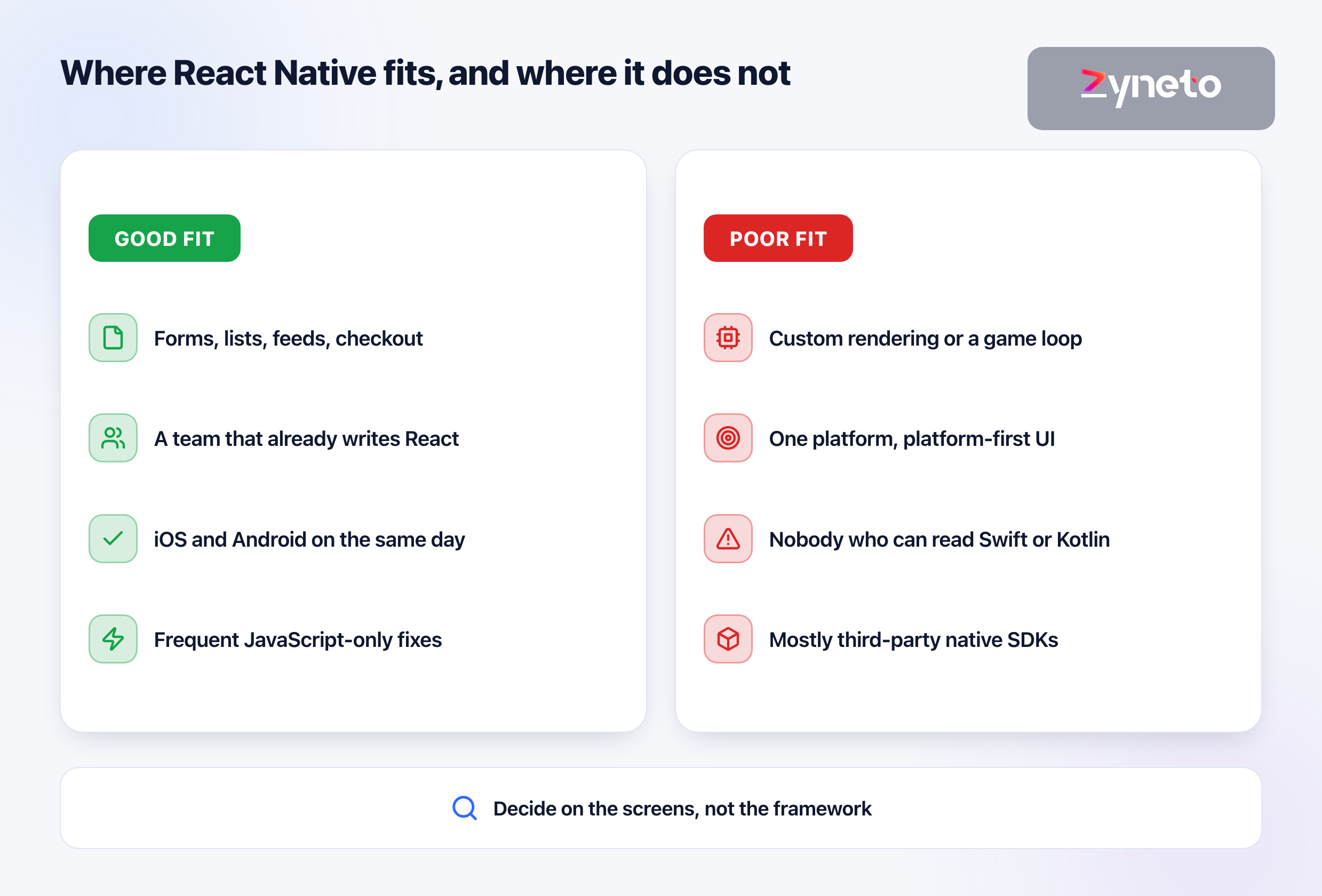
A team that already writes React is the strongest argument. Components, hooks, state management and TypeScript carry over directly. The thing that does not carry over is the platform: permissions, background execution, push notification entitlements, app signing, and store review. Those are learned, not inherited.
Shipping iOS and Android on the same day is the second strongest. With 2 native teams, keeping the platforms level is a coordination job, and when it slips you are running 2 product roadmaps. React Native removes that by construction rather than by discipline.
Custom rendering is where it stops paying. A drawing tool, a game loop, a camera pipeline that processes every frame, a map with thousands of animated markers. You can do all of these in React Native through native modules, but at that point most of your hard code is native anyway and the shared layer is a thin shell.
A single platform app gains nothing. If the product is iPad only, or Android only for a fleet of managed devices, cross-platform buys you nothing and costs you the abstraction.
An app that is mostly third-party native SDKs is the quiet trap. Payments terminals, Bluetooth hardware, a vendor's identity SDK, an in-house video engine. Each needs a React Native wrapper, and every wrapper is a dependency you will upgrade every time React Native moves. The next 2 sections are about why that matters.
Start on Expo unless you have a specific reason not to. That is now the official position of the React Native docs, and our measurements below explain why it is the right default rather than a convenience.
Expo is a framework and a set of services. The framework is open source: a module system, file based routing, and maintained native packages for the things every app needs, from images and fonts to the splash screen. The services, EAS, build your binaries in the cloud and push over-the-air updates. You can use the first without paying for the second.
The decisive fact is release cadence. React Native shipped 6 minor versions in the 12 months to October 2026. Expo publishes 3 SDKs a year, each pinned to 1 React Native version that the Expo team has already tested its own packages against. Expo SDK 57, released 30 June 2026, ships React Native 0.86, while React Native itself is on 0.87. That lag is a feature: an Expo app upgrades 3 times a year to a combination someone else has already validated, while a bare app either tracks 6 releases or falls behind on its own.
Bare React Native makes sense in 3 cases. You are adding React Native screens to an existing native app, which is how Shopify migrated its largest app screen by screen. You depend on a native SDK whose integration fights Expo's build process. Or you have native engineers who want full control of the Xcode and Gradle projects and will own them.
EAS pricing as published on 6 October 2026:
Plan | Monthly price | Included |
Free | $0 | 15 Android and 15 iOS low priority builds, 1,000 update users |
Starter | $19 plus usage | $45 of build credit, 3,000 update users |
Production | $199 plus usage | $225 of build credit, 50,000 update users |
Enterprise | Custom | From $1,000 of credit, 1,000,000 update users |
Builds outside the credit cost $1 to $4 each by platform and machine size. Add the store fees, $99 a year for the Apple Developer Program and a one-time $25 for Google Play, and the fixed cost of running a React Native app is small. The variable cost is everything that follows.
We generated 2 apps with create-expo-app on 6 October 2026, on Expo SDK 57 with React Native 0.86.3 and React 19.2.3, and exported production bundles for both platforms. The machine was a 2019 MacBook Pro with an Intel i7-9750H and 16 GB of memory, on Node 24.19.
Measurement | Blank template | Default template |
Direct dependencies | 4 | 23 |
npm packages installed | 477 | 617 |
| 329 MB | 564 MB |
Packages containing native code | 5 | 28 |
Hermes bytecode, Android | 1.43 MB | 3.67 MB |
Hermes bytecode, iOS | 1.43 MB | 3.46 MB |
Production export time | 19 s | 71 s, including web |
A blank app is 1.43 MB of bytecode before you write a screen. That is React, React Native and Expo's runtime, compiled. It is not where your size problems come from.
The default template is 2.5 times heavier because it adds navigation, gestures, animation, images and safe area handling. Every real app needs those, so treat 3.5 to 3.7 MB as the realistic floor and measure every library you add against it.
The number that matters is 28. The default template, before you write any code, depends on 28 packages that contain native iOS or Android code. 21 are maintained by Expo, 1 is React Native itself, and 6 are third-party: React Native Gesture Handler, Reanimated, Worklets, Screens, Safe Area Context and Masked View. Every one of those has to be compatible with each React Native version you move to. A production app typically adds payments, analytics, crash reporting, push, maps and authentication, each with its own native layer. The count of native packages is the best single predictor of what an upgrade will cost you, and nobody puts it in a proposal.
Ask any vendor for that number. Before a React Native build starts, the dependency list should exist, and for each entry you should know whether it has native code, who maintains it, and how quickly it shipped support for the last 3 React Native releases. That list is short work and decides more about year 2 than the framework choice does.
React Native shipped 12 minor versions between October 2024 and August 2026, an average of 59.7 days apart. We read every publication date from the npm registry. The React Native team supports only the latest 3 minors, so on 6 October 2026 0.87 and 0.86 are active, 0.85 is getting its final patch, and everything from 0.84 back receives nothing.
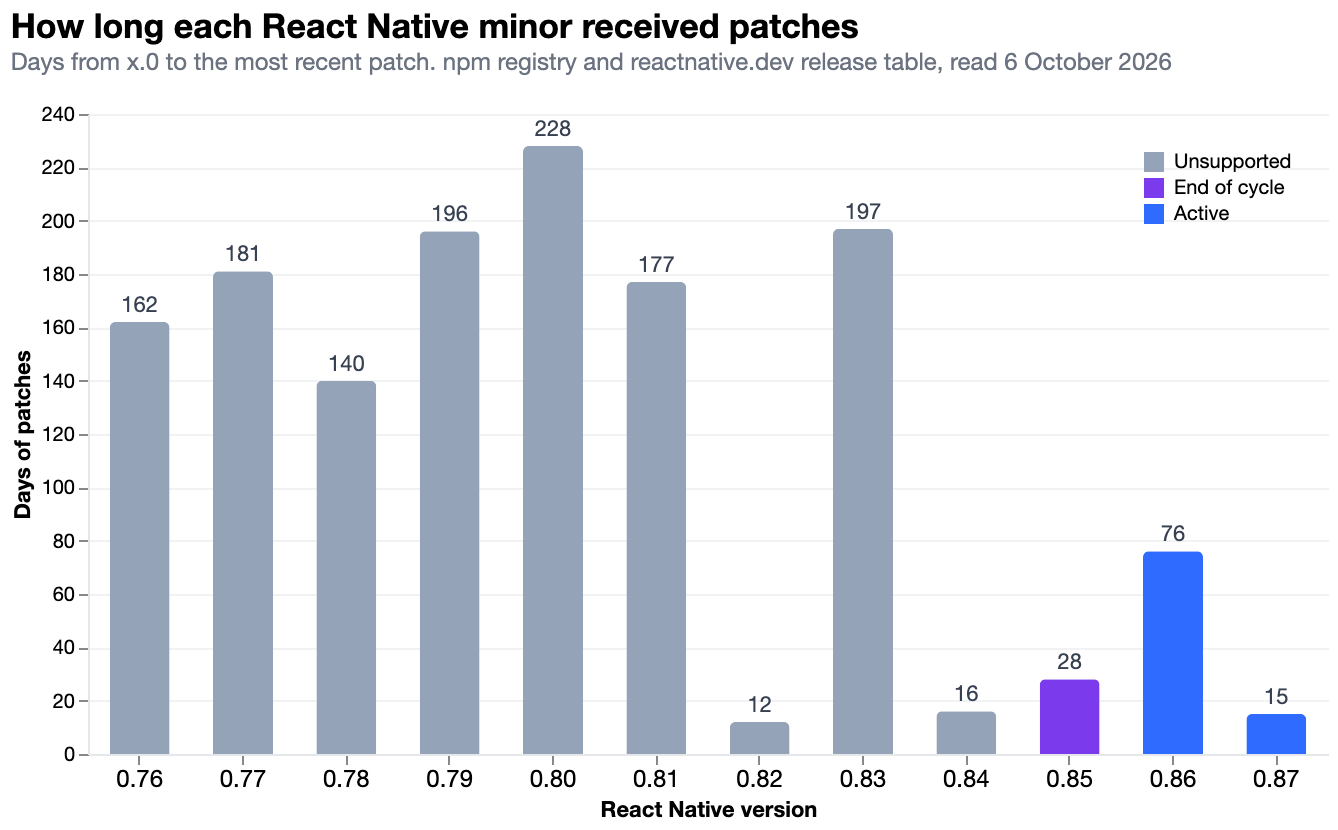
How long a version keeps receiving fixes is uneven, and that matters more than the average. 0.80 received patches for 228 days. 0.82 received its last patch 12 days after release, and 0.84 after 16. If you land on a short-lived version, your support window closes before your next planned upgrade.
The official template is not where the work is. We diffed the React Native template across all 11 upgrades from 0.76 to 0.87. Each hop touched between 1 and 13 files, and the whole 2 year journey changed 30 files, adding 209 lines and removing 575. The biggest single change was 0.77 replacing the Objective-C app delegate on iOS with a Swift one. These are small, readable diffs.
The work is in your 28 native packages, and the stores set the deadline. A template-generated app on 0.80 or earlier targets Android API 35 or lower. Google Play has required API 36 for all new apps and updates since 31 August 2026, with extensions available to 1 November. The template first targeted 36 in 0.81, on 12 August 2025. Apple has required apps to be built with the iOS 26 SDK, which means Xcode 26, since 28 April 2026. Neither store cares that your framework release is unsupported. They block the upload.
Google adds a second deadline for memory page sizes. Since 1 November 2025, new apps and updates targeting Android 15 or later must support 16 KB memory pages on 64-bit devices. React Native itself has supported them since 0.77, but every library in your app that ships compiled C or C++ code has to support them too, which is the native package problem again.
The policy that works is boring. Upgrade 1 minor at a time, never more than 2 behind. On Expo, take every SDK, which is 3 upgrades a year. Never skip several versions to save effort, because the 11 small diffs above become 1 large one with all the breaking changes stacked together and no way to tell which caused which crash.
React Native can push JavaScript changes straight to installed apps without a store review, through Expo's EAS Update or a self-hosted equivalent. For a team used to waiting on review, this changes how you ship fixes. It also has a hard boundary that is written into both stores' contracts.
Apple permits it under section 3.3.1(B) of the Developer Program License Agreement. Interpreted code may be downloaded if it does not change the app's primary purpose by adding features inconsistent with how the app was submitted and advertised, does not bypass signing, the sandbox or other OS security, and does not create a store for other code. App Review Guideline 2.5.2 says the same thing from the reviewer's side.
Google Play permits it under the Device and Network Abuse policy. Apps may not download executable native code from outside Play, but code running in a virtual machine or interpreter, such as JavaScript, is exempt as long as it does not enable other policy violations.
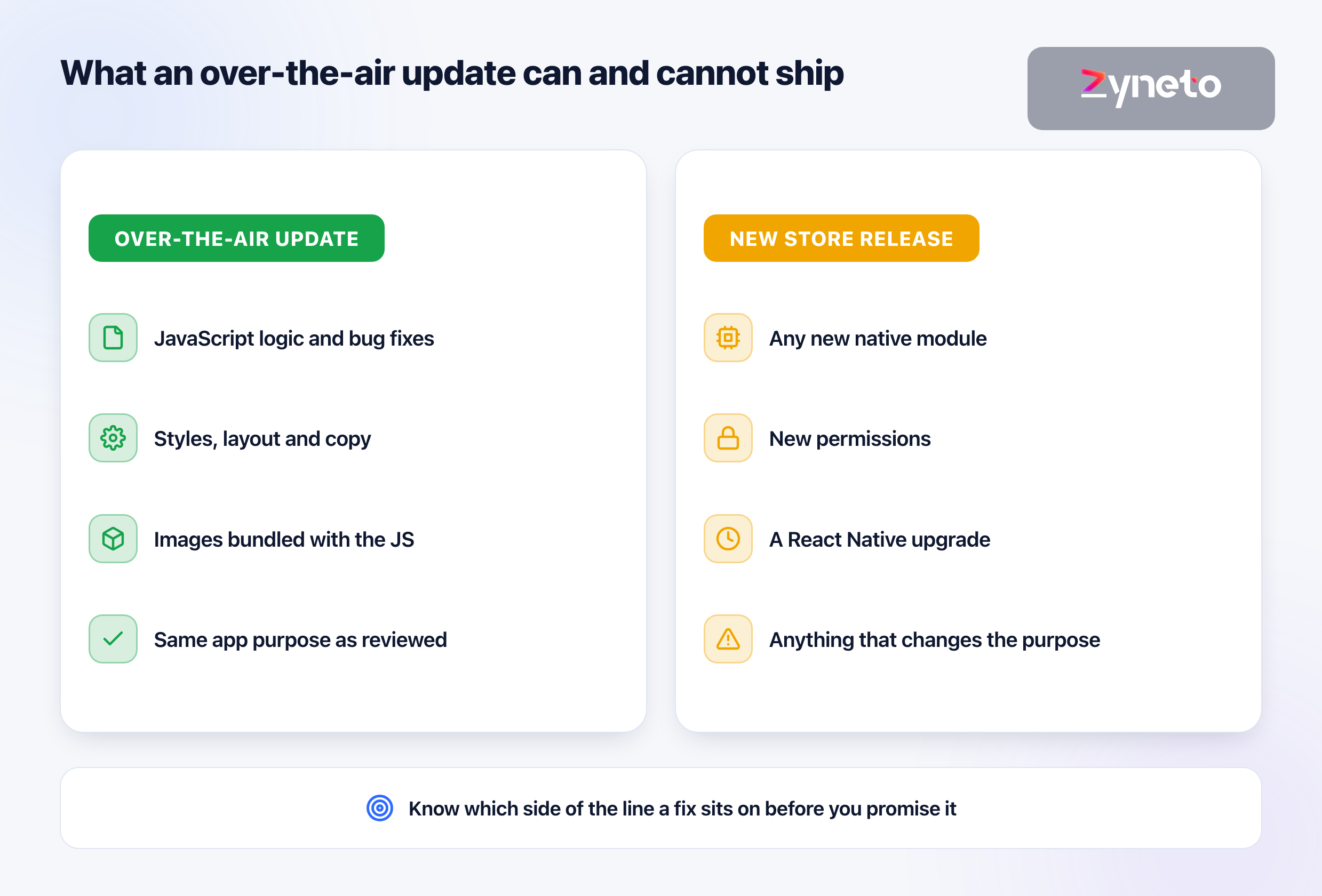
The technical boundary is stricter than the legal one. An over-the-air update replaces the JavaScript bundle and its assets. It cannot add a native module, request a new permission, change the React Native version, or alter anything in the iOS or Android project. Every one of those needs a new binary, a review and a staged rollout.
Know which side of the line a fix sits on before you promise it. A pricing bug in a JavaScript component can go out as an over-the-air update. The same bug caused by a native payments SDK is a store release. Teams that do not draw this line in advance tell customers a fix is coming today and then wait on review.
React Native does not remove the need for native skills. It reduces how many of you need them. The framework is JavaScript on top, but signing certificates, provisioning profiles, Gradle builds, push entitlements, background task limits and store rejections are all native problems with native error messages. When an upgrade breaks the iOS build at 6 pm, the person who fixes it reads Swift and Xcode logs.
The shape that works is mostly React engineers with 1 native owner. For a team of 5, that means 4 engineers who build features in TypeScript and 1 who owns the iOS and Android projects, the native dependencies and the upgrade calendar. That owner does not need to be a senior iOS specialist and a senior Android specialist. They need to be unafraid of both.
Expect platform work to cluster, not spread. Most weeks the native owner writes features like everyone else. Then an SDK update, a store deadline or an upgrade arrives and they need uninterrupted time. Plan for those bursts, or the upgrade slips.
The split between apps matters as much as the split between people. On our grocery build for Al Amri Express in Oman, the customer app and the warehouse operations app are separate React Native applications on a shared backend. We split them because the audiences share almost no screens, and warehouse staff release on a very different cadence from shoppers. One app with a role switch would have tied every warehouse fix to the consumer release schedule. The Al Amri Express case study has the rest of the decisions, including what we would do differently.
Hire for React first, then test for the platform. Ask a candidate to explain what happens between eas build and an app appearing in TestFlight. Anyone who can walk through signing, provisioning and review without hand waving can own the native side. Anyone who cannot will need someone who can.
Your board will ask, so here is the honest version. In the 2024 Stack Overflow Developer Survey, 8.4 per cent of all respondents and 9.0 per cent of professional developers had used React Native in the past year, against 9.4 per cent for Flutter in both groups. The 2025 survey dropped the question, so there is no newer figure from that source.
Microsoft is a current user that publishes detail. In May 2025 the Office team wrote that more than 40 Office experiences are built with React Native, including the Copilot experience in Word. Meta's own showcase lists Facebook Marketplace, Ads Manager and the Meta Horizon app on Quest.
For the decision you are making, the relevant comparison is with Flutter, which solves the same problem with a different bet: its own rendering engine instead of the platform's native views. That is a separate decision with its own trade-offs, and our Flutter app development team works with both.
Write the dependency list before the first sprint. Every library, whether it has native code, who maintains it, and the date it supported each of the last 3 React Native releases. Any library that lagged by more than 1 release is a risk you are choosing deliberately or replacing now.
Start on the current Expo SDK, not the newest React Native. You get a combination tested by the people who maintain your navigation, images and splash screen, and you upgrade 3 times a year instead of 6. Our React Native app development projects start here by default for that reason.
Put the upgrade on the calendar on day 1. Every new Expo SDK gets a ticket, an owner and a date within 4 weeks of release. Treat a missed upgrade like a missed security patch, because after 2 missed releases that is what it becomes.
Build both platforms in CI from the first commit. A native build that nobody ran is where an upgrade's breakage hides. If the Android build only runs when someone releases, the failure arrives at the worst moment.
Decide your over-the-air policy before launch. Which changes may go out without review, who approves them, how you roll back, and what you will never send over the air. Write it down where your support team can read it.
Record the 2 store deadlines that bind you. Google raised its target API requirement on 31 August in both 2025 and 2026, and Apple announced its 2026 SDK minimum almost 3 months before it applied. Each blocks uploads on the day it lands. Neither is optional.
The short version. React Native in 2026 is a mature, New Architecture only framework that ships real native views and fits most product apps. The cost of choosing it is not the build. It is a new minor version every 60 days, a support window of 3 releases, 28 native packages in the default starter alone, and 2 app stores that will block your next update if you fall behind. Pick it when your team writes React and your screens are ordinary, start on Expo, keep 1 person who reads Swift and Kotlin, and budget for upgrades the way you budget for hosting. Shopify's move back to native says the cost of building twice is falling. Whether it has fallen far enough for your team is a question to ask again every year, not once.
Yes, for most product apps built by a team that already writes React. React Native now runs only on its New Architecture, renders real native views, and Microsoft builds more than 40 Office experiences with it. It is a poor choice for apps built around custom rendering, for apps that target only 1 platform, and for teams with nobody who can work in Swift and Kotlin when a native build breaks.
Shopify announced on 10 September 2026 that it is moving its apps to native Swift and Kotlin because coding agents have made building each feature twice, once per platform, cheap enough that a shared codebase no longer pays for itself at its scale. Shopify's own post still calls React Native an excellent framework. The reason is economic and depends on having mature native teams and an internal agent pipeline, which most companies do not.
Use Expo for a new app unless you have a specific reason not to. The React Native documentation now recommends starting with a framework such as Expo. Expo releases 3 SDKs a year, each pinned to a React Native version it has tested its own packages against, so you upgrade 3 times a year instead of tracking 6 React Native releases. Choose bare React Native when adding React Native screens to an existing native app, or when a native SDK you depend on cannot work within Expo's build process.
React Native released a new minor version every 59.7 days on average between 0.76 in October 2024 and 0.87 in August 2026, according to npm registry publication dates. The React Native team supports only the latest 3 minor versions, so a version stops receiving fixes roughly 6 months after release, and some recent versions received their last patch within 30 days.
Yes, for JavaScript and asset changes. Apple's Developer Program License Agreement, section 3.3.1(B), allows downloaded interpreted code if it does not change the app's primary purpose, bypass OS security, or create a store for other code. Google Play's Device and Network Abuse policy exempts code running in an interpreter such as JavaScript. Any change to native code, permissions or the React Native version still needs a new store release.
A blank Expo app on React Native 0.86.3 compiles to 1.43 MB of Hermes bytecode on Android, measured on 6 October 2026. The default Expo template, which adds navigation, gestures, animation and images, compiles to 3.67 MB on Android and 3.46 MB on iOS. The installed app is larger because it also contains the native React Native and Hermes libraries, so measure your own release build rather than relying on a quoted figure.
You need at least 1 engineer who can work in both native projects, but not a full team for each platform. App signing, provisioning, push notification entitlements, background execution limits, store rejections and React Native upgrades all surface as native problems with native error messages. A common working shape is a team of React engineers with 1 person who owns the iOS and Android projects, the native dependencies and the upgrade calendar.

Vikas has around fifteen years of experience building software and now builds generative AI systems at Zyneto. His work covers retrieval augmented generation, agentic AI, knowledge graphs, AI memory, and the evaluation and guardrails that decide whether any of it is safe to put in front of customers. He has shipped enterprise copilots, document AI, chatbots and predictive analytics for e-commerce, fintech and marketing teams, and works day to day in Python, JavaScript and SQL. He follows multimodal models, business process automation and enterprise AI security closely, and mentors engineers moving into AI. He writes about architecture, inference cost and the failure modes that only show up at production scale.
Share your details and we will talk soon.
Be the first to access expert strategies, actionable tips, and the trends actually shaping the digital world. No fluff - just practical insights delivered straight to your inbox.
Dive into our blog and stay ahead of the curve with expert perspectives, future-ready trends, and tech tips written for decision-makers and doers alike.